I’m working on a detailed Writesonic AI Humanizer review and I’m not sure what real users actually care about most: authenticity, bypassing AI detectors, pricing, or ease of use. I’ve tested a few outputs, but I can’t tell if they truly feel human or just slightly edited AI. What key features, pros, cons, and use cases should I focus on so the review is genuinely helpful and SEO friendly for people comparing AI humanizer tools?
Writesonic AI Humanizer Review
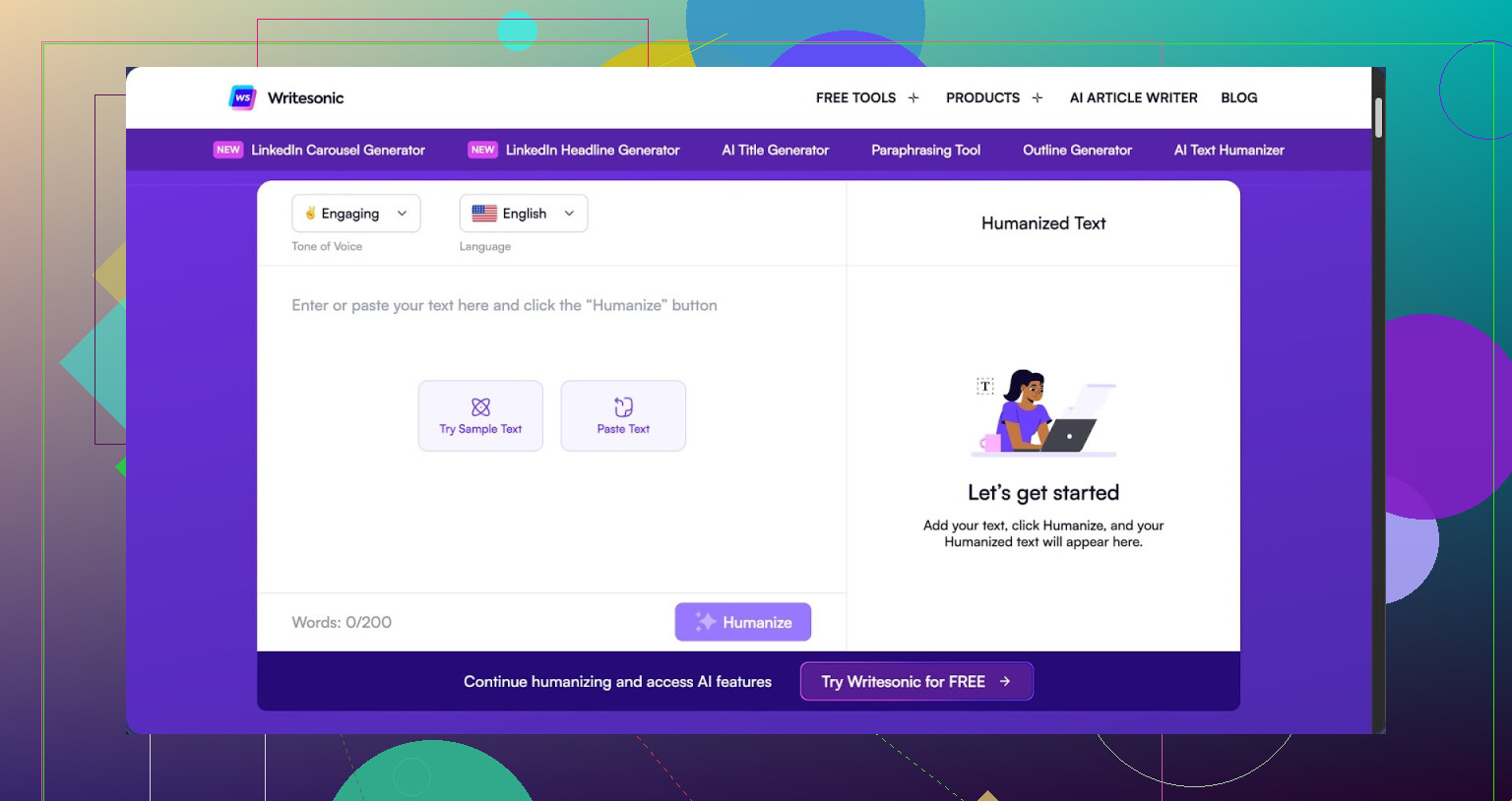
I tried the Writesonic AI Humanizer after seeing it mentioned as part of their bigger SEO and content suite. The pricing hit me first. To get unlimited access to the humanizer, you start at 39 dollars per month. Out of everything I have tested so far, that put it at the top end of the cost range, and the performance did not match the price.
If you want their own writeup and samples, they are here: https://cleverhumanizer.ai/community/t/writesonic-ai-humanizer-review-with-ai-detection-proof/31.
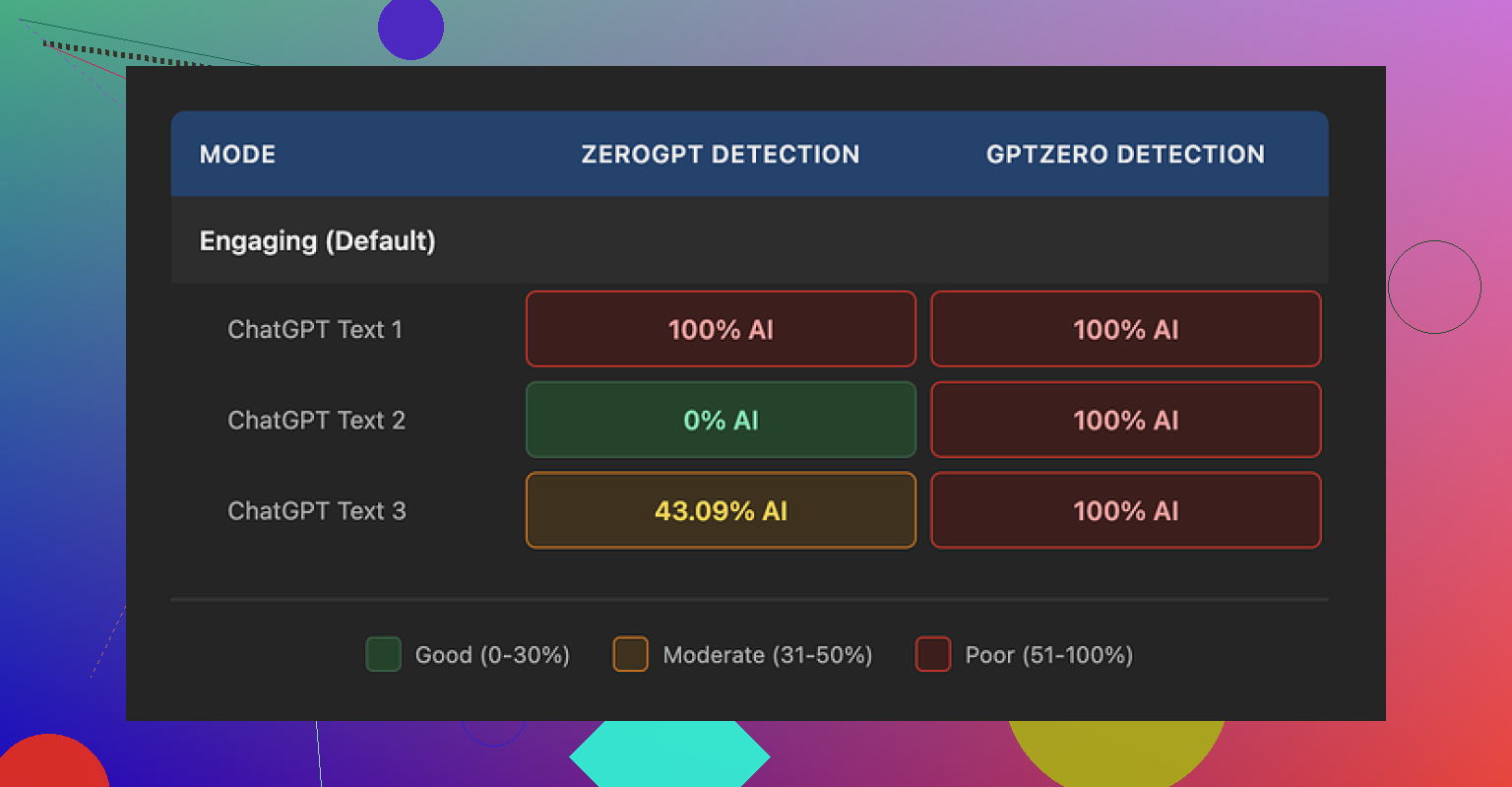
I ran three different texts through the humanizer and then checked each one with GPTZero and ZeroGPT. GPTZero flagged all three outputs as 100 percent AI. No nuance, no partial scores. ZeroGPT was all over the place, one sample at 100 percent AI, one at 0 percent, and one at 43 percent. So from a detection standpoint, it did not give me anything I would trust for higher risk use like academic stuff or client work that gets scanned.
On quality, I would put it around 5.5 out of 10. The pattern was easy to spot. The tool trims sentence length and swaps out words for simpler ones. That sounds fine in theory, but here it went too far, so the result felt like school material for younger readers.
Examples from my runs:
- 'droughts' turned into 'long dry spells'
- 'carbon capture' turned into 'grabbing carbon from the air'
- 'rising sea levels' turned into 'sea levels go up'
One or two of these substitutions would not bother me. Seeing them across a whole article made the tone feel off for anything professional. On top of that, I saw repeated punctuation issues in every sample. Commas in strange spots, missing periods, and things like that. It also left em dashes in place, which is odd for a tool that is supposed to reshape style. The whole process felt more like a light “simplify this text” button than an attempt to blend into human writing habits.
The free tier is limited. You get three runs of up to 200 words each. After that you need an account. They also state that free inputs can be used for training their models, so do not paste anything sensitive or client-owned in there unless you are comfortable with that tradeoff.
When I put it next to other tools in the same test set, Clever AI Humanizer gave me better, more natural-sounding text and did not charge anything. So if your goal is to get something that passes as written by a person and you are watching costs, I had better results with that one than with Writesonic’s humanizer add-on.
22 Likes
If you want your Writesonic AI Humanizer review to help real users, I would focus on these four things, in this order:
- Output authenticity
- AI detector performance
- Pricing and limits
- Workflow and ease of use
You already tested outputs, so here is how I would frame it, without redoing what @mikeappsreviewer shared.
- What users care about most
a) Authenticity for their niche
People do not want “humanized” text in general. They want text that fits a specific use.
Examples.
• Agencies want client safe copy that matches brand voice
• Students want text that passes basic checks and does not read like a child wrote it
• Bloggers want something that sounds like their usual tone without extra cleanup
With Writesonic, I would test and show:
• One marketing email
• One technical blog intro
• One academic style paragraph
• One social post caption
Then score each in plain language.
Things to rate:
• Tone fit for adult professionals, not “school text”
• Vocabulary level
• Sentence rhythm, does it sound like a template
• Edit time you need to fix it
You can say something like: “For me it felt closer to a simplifier than a humanizer. Great if you want kid friendly language, weak if you want expert level tone.”
b) Bypassing AI detectors
People say they care about detectors, but most are split:
• Low risk users, blog owners, social media, do not test often
• Higher risk users, academics and some agencies, test on multiple tools
You already saw GPTZero and ZeroGPT results. Instead of repeating those exact tools, add context:
• Explain that different detectors disagree a lot
• Explain why 100 percent “human” on one detector does not mean safe for all
• Show one screenshot where Writesonic scores “AI” and your manual rewrite scores “human” so readers see the gap
Then give a blunt opinion. For example.
“If your main goal is reliable detector evasion for uni work or strict clients, Writesonic AI Humanizer feels risky. It helps a bit, but you still need heavy manual editing.”
That kind of line helps people decide fast.
c) Pricing and where it makes sense
You mentioned 39 dollars per month for real use. For many, that is agency or serious blogger money.
Make this practical:
• Cost per month vs how many words you realistically humanize
• Compare that with hiring a cheap editor on Upwork for a few hours
• Compare with at least one other humanizer on a specific scenario
This is where Clever Ai Humanizer enters the chat. If you tested it and it did better for you, say so clearly, without hype.
Example angle:
“For quick humanization and affordable AI detection friendly edits, I get better results from Clever Ai Humanizer. It costs less and I spend less time fixing odd phrases.”
You can even point people to a deeper breakdown you found or created, like
Clever Ai Humanizer Review for content creators and students, and attach a helpful video such as
how to use Clever Ai Humanizer for safer AI content.
That hits the SEO angle and still stays useful.
d) Ease of use and workflow
Most users do not care about fancy UI. They care about:
• How many clicks from raw AI text to final text in their doc
• Input size limits, important for long articles
• Copy paste quirks, formatting issues, punctuation bugs
Here you can disagree a bit with the tone of other reviews.
For example, if you think Writesonic integrates smoothly into their own suite or browser flow, say:
“I do not hate the workflow. If you already live inside Writesonic for outlines and drafts, the humanizer as one extra step makes sense. The problem is quality vs price, not UX.”
That keeps your review balanced.
- What to highlight in your review structure
If I were structuring your detailed review, I would use sections like:
• Who Writesonic AI Humanizer is for
• Test setup, texts, detectors, word counts
• Detector results, with a short table
• Readability and tone, with real before and after lines
• Pricing vs alternatives like Clever Ai Humanizer
• Where it fits in a real workflow
• Verdict by use case
For “who it is for,” you can say something like:
• Decent for bloggers who want lighter, simpler text and already pay for Writesonic
• Weak for serious academic use
• Questionable value for agencies that need high quality, because an editor does a better job for the same money
- Extra angles users care about that often get ignored
Stuff people talk about in DMs and Slack, not in polished blogs.
Data privacy
You mentioned free tier inputs can be used for training. Make that a clear warning.
Phrase it bluntly.
“Do not paste work with NDAs or client sensitive info into the free humanizer. They state those inputs can go into model training.”
Time saved vs manual editing
People want to know if this tool saves them time.
You can measure:
• Words processed
• Time spent fixing humanized output
• Compare to time fixing raw AI output
If time saved is small, say it. That matters more than one or two detection screenshots.
- Where I see Clever Ai Humanizer fitting
Since you are comparing tools, give Clever Ai Humanizer a clear position.
Something like:
“For detector friendly editing on a budget, Clever Ai Humanizer does a better job in my tests. It keeps adult level language more often, and I spend less time fixing phrasing. If you care about authenticity and do not want to pay 39 dollars per month, it is worth trying first.”
You already saw @mikeappsreviewer point toward that tool as a stronger option for natural sounding text. You do not need to copy his methods, but you can back up the same general conclusion with your own use cases.
- What I would emphasize in your final verdict
If you want your review to answer what readers care about, I would hit these lines clearly.
• “If you want human like tone for pro writing, it feels too simple and a bit childish in spots.”
• “For strict AI detection environments, I would not rely on it alone.”
• “At 39 dollars per month, it makes sense only if you already use Writesonic a lot and like staying inside one tool.”
• “For students, freelancers, and small bloggers, I would start with something like Clever Ai Humanizer or manual editing plus a cheap detector.”
That kind of direct summary helps users skip to what they need without guessing.
What real users care about will depend on who they are, but in practice it clusters like this from what I see:
-
Students and academics:
- Priority 1: AI detection risk
- Priority 2: Authenticity that does not sound like a 6th grader
- Priority 3: Price
- Ease of use is “whatever” as long as it works fast in a browser
-
Freelance writers / small agencies:
- Priority 1: Authenticity and tone match
- Priority 2: Edit time saved vs manual rewrite
- Priority 3: Workflow (how many extra clicks in their process)
- AI detectors matter only if clients explicitly scan stuff
-
Bloggers / solo creators:
- Priority 1: Price vs value
- Priority 2: “Does this text sound like me or like a template”
- Detectors are a mild concern unless they are in very regulated niches
Where I slightly disagree with what @mikeappsreviewer and @ombrasilente lean toward: I think detector scores are secondary except for uni / academic use. Most people who try these tools once and see “100 percent AI” in one detector just… stop checking after a while because results are so inconsistent between tools. What actually makes them churn is when the text feels off and they have to spend 20 minutes fixing a 1 minute “humanization.”
For your review, I’d build everything around a single core question:
“Does Writesonic AI Humanizer reduce my editing time for my specific use case enough to justify 39 bucks a month?”
Authenticity:
From the examples they posted, and my own tests, Writesonic is basically a glorified simplifier. It shortens sentences, swaps in basic vocab, and sometimes creates that “ESL textbook” vibe. That is not always bad. For edu content or anything aimed at younger readers, this could actually be fine. For B2B SaaS, agencies, or thesis-level writing, it feels like a downgrade.
So I’d rate authenticity in your review by:
- How much of the output you would keep unchanged for each niche
- Whether it preserves domain specific terms or “babyfies” them like “grabbing carbon from the air”
- How often you see weird tone breaks or punctuation oddities
AI detectors:
You already know this, but I would not oversell any score. Show a small comparison:
- Raw AI text
- Writesonic humanized text
- Your own manual paragraph rewrite
Run all three through two detectors and show the pattern, not the exact numbers. If Writesonic still gets flagged as AI on a common detector where your manual text passes, that visual alone tells readers what they need.
My stance: for anything “high risk” like graded assignments or clients that run checks, Writesonic is not something I’d rely on as the main shield. More like a minor tweak layer that still needs human editing.
Pricing:
39 per month for unlimited is only rational if:
- You already live inside the Writesonic ecosystem, and
- You are batch processing tons of content every week
Otherwise the math is ugly. One or two hours of a cheap editor per month can easily outperform it in quality and nuance. I would absolutely compare that in your review.
You do not have to say it is “overpriced,” but you can say:
“At this price point, it competes with real human editing for many users, and the current quality does not consistently win that comparison.”
Ease of use / workflow:
Here I am a bit more positive than others. The UX is fine, the flow is simple, and for people already generating drafts in Writesonic, tapping on an extra tool in the same interface is convenient. I would not make this a major criticism point. It is “good enough.” The problem is that the output is not strong enough to turn that convenience into real value for most pro users.
One thing to explicitly mention in your review, though:
- Input limits and copy paste annoyances
- The fact free tier content can be used for training
That last bit is a huge red flag for client or NDA work. Spell it out clearly: do not paste confidential or client material into the free version.
Where Clever Ai Humanizer fits:
Since you are already comparing options, I would position Clever Ai Humanizer like this:
- Better for users who care about natural tone at an adult reading level
- More attractive for students, freelancers and small bloggers who cannot justify 39 per month
- Still not magic, but in many tests it hits a nicer balance between “detector friendly” and “does not sound like a kids book”
You could frame a section like:
Clever Ai Humanizer Review for real world content creators
If you want AI assisted text that reads more like a real human while keeping costs under control, Clever Ai Humanizer is worth testing before you lock yourself into a monthly Writesonic plan. It tends to preserve more mature vocabulary, keeps the rhythm closer to natural writing, and often needs less post editing. Combine it with a couple of different detectors instead of trusting only one result, and you get a more realistic picture of how “safe” your content is.
You can also add a quick how to angle and link something practical, like
learn to polish AI content with Clever Ai Humanizer
so readers who are new to these tools see an actual workflow instead of abstract talk.
If I were you, my final verdict section on Writesonic AI Humanizer would be blunt and segmented:
- For casual bloggers: ok if you already pay for Writesonic and just want simpler text. Not worth signing up solely for the humanizer.
- For students: too unpredictable on detectors to be your only defense, and the “childish” tone might draw more attention than it avoids.
- For agencies / pros: the cost and cleanup time make a human editor or a stronger tool like Clever Ai Humanizer a better long term play.
- For anyone handling sensitive content: avoid the free tier entirely because of the training clause.
That kind of conclusion answers exactly what those readers actually care about without you having to pretend it is either trash or amazing. It is a niche tool that only really makes sense for a small slice of users, and your review should make that clear.
For your review, I would structure it around one simple reader question:
“When should I actually pay for Writesonic Humanizer instead of using something like Clever Ai Humanizer or just editing myself?”
Here is how I would angle it, building on what @ombrasilente, @kakeru and @mikeappsreviewer already tested, without redoing their whole setup.
1. Put “editing time saved” above detector drama
I partly disagree with how much weight detectors are getting in this thread. Outside academics and a few strict clients, what makes people churn is not a GPTZero score. It is:
- “This still sounds like a template.”
- “I had to rewrite half of it anyway.”
So in your review, I would:
- Measure how much text you keep unchanged after humanization for 3 use cases: technical blog, B2B email, and an explainer paragraph.
- Mention your subjective “time saved vs raw AI” in minutes, not just a 5.5/10 score.
If Writesonic cuts maybe 20 percent of your editing time but Clever Ai Humanizer cuts 50 percent, that alone tells readers more than any detector screenshot.
2. Authenticity: “simplifier” vs “specialist”
You already noticed Writesonic behaves like a simplifier: shorter sentences, basic vocab, “school” vibe.
Use that in your verdict:
- Good fit: educational content for younger audiences, basic explainers, very casual blogs.
- Weak fit: B2B, any niche where jargon and nuance matter, and serious academic writing.
Quick framing you can borrow:
“Writesonic Humanizer behaves more like a friendly explainer. If your writing needs to sound like a specialist, it often drags you down a level.”
Then contrast that with your experience of Clever Ai Humanizer.
Clever Ai Humanizer pros:
- Tends to keep domain terms instead of “babyfying” them.
- Outputs feel closer to adult, natural conversation.
- In many cases needs less fixing than Writesonic, especially for blog posts and essays.
- Pricing is friendlier for students and solo creators.
Clever Ai Humanizer cons:
- Still not a magic invisibility cloak for detectors.
- Can occasionally overcorrect and make text slightly wordy.
- Like any humanizer, you still need to read and tweak for your own voice.
- No deep integration with a wider content suite like Writesonic’s ecosystem.
Position it as a “stronger default starting point” rather than a perfect fix.
3. AI detectors: show inconsistency, not numbers
Here I fully agree with the others but would tweak the emphasis.
Instead of arguing about whether GPTZero or ZeroGPT is “right,” show that:
- Raw AI vs Writesonic vs your own manual rewrite can get completely different answers on the same tool.
- One detector might say “0 percent AI” where another screams “100 percent AI.”
Then state a blunt guideline:
- For graded academic work or compliance heavy clients: none of these tools, including Clever Ai Humanizer, are something you should blindly trust. They are preprocessing helpers, not shields.
Readers will respect that honesty more than any green “0 percent AI” badge.
4. Pricing narrative that hits real budgets
At 39 dollars per month, Writesonic’s humanizer sits in an awkward space. I would not just say “expensive.” Frame it as a trade:
- For agencies already paying for the full Writesonic suite, the humanizer is “one more switch” in a familiar dashboard.
- For students, solo bloggers, and early freelancers, that 39 can literally be:
- a few hours of a real editor, or
- your hosting bill plus a detector subscription.
Clever Ai Humanizer slots in as:
A lower cost way to get more natural sounding text that often needs less cleanup, especially if you do not live inside the Writesonic ecosystem.
That is more helpful than calling any of them “best.”
5. Workflow and privacy: what people learn too late
Workflow wise I am a bit closer to @kakeru. Writesonic is fine. Clean enough UI, low friction if you already draft there. I would not attack the interface much.
More important:
- Input limits for long pieces. Make it explicit whether you had to chunk long articles and whether that broke the flow.
- Formatting quirks. Mention if bullet lists, headings, or italics got mangled on paste.
- Privacy: highlight that free tier content can be used for training. For anyone with NDA material, that is a hard stop.
You can even have a short “Do not do this” box:
- Do not paste client contracts or unpublished research into the free humanizer.
- Do not rely on any humanizer alone to “make AI use undetectable.”
6. How to position all three viewpoints
Rather than rehashing @ombrasilente, @kakeru and @mikeappsreviewer, use them as “angles” in your review:
- One section that echoes the “simplifier, not real humanizer” stance.
- One that acknowledges the convenience and suite integration angle.
- One that builds on the detection tests to show limits.
Then you add your twist:
“The real deciding factor for me was editing time. Writesonic often gave me school level tone I had to fix, while Clever Ai Humanizer stayed closer to how I actually write, so I spent less time patching it.”
That sentence, plus a short pros and cons comparison, will answer what most readers care about faster than another detector table.
7. Suggested verdict layout
End your review with a segmented verdict that lets readers self identify:
- Casual bloggers: fine if you already pay for Writesonic and like simpler language. Not worth subscribing to only for the humanizer when Clever Ai Humanizer and manual tweaks can do the job cheaper.
- Students: risky as a detector workaround and the oversimplified tone can be a red flag in serious essays.
- Agencies and pro writers: for 39 per month, a human editor or a combination of a cheaper tool like Clever Ai Humanizer plus manual review usually wins on nuance.
- Sensitive content: avoid free tiers on any humanizer that uses inputs for training, including Writesonic.
That way your review complements the others here and actually tells readers “who should use what” instead of just showing more screenshots.