I accidentally deleted important photos and videos from my SD card and I’m trying to figure out if they can still be recovered or if they’re permanently gone. The card was in my camera, and I really need help finding the safest way to recover deleted files from an SD card without making things worse.
I did this once with a camera card after a weekend trip, and the first mistake is usually panic. If your photos or videos were deleted from an SD card, stop using the card now. Pull it out of the camera, phone, or reader and leave it alone.
What got deleted first was usually the file table entry, not the photo data itself. The card marks the space as free, so your device starts treating it like empty storage. Your old files often still sit there until new data lands on top of them. If you keep shooting, you raise the odds of permanent loss fast.

Use recovery software. Skip repair tools from the operating system. CHKDSK on Windows and First Aid on Mac are for file system repair, not undelete work. I’ve seen them make the situation worse by cleaning up the same hidden records you were hoping to recover.
Here’s the order I’d follow.
- Use a real card reader
Plug the SD card into your computer with a dedicated card reader. Don’t keep the card inside the camera and connect the camera by USB if you have another option. A plain reader tends to give recovery apps cleaner access to the card.
- Start with software made for this
I’ve tried a pile of these over time. The one I’d reach for first is Disk Drill.
What I liked:
- Deep scans on SD cards tend to pull up more than the quick tools
- You get previews, which saves time because you can check whether a photo or clip opens before recovering it
- It’s easier to sort the good stuff from the junk
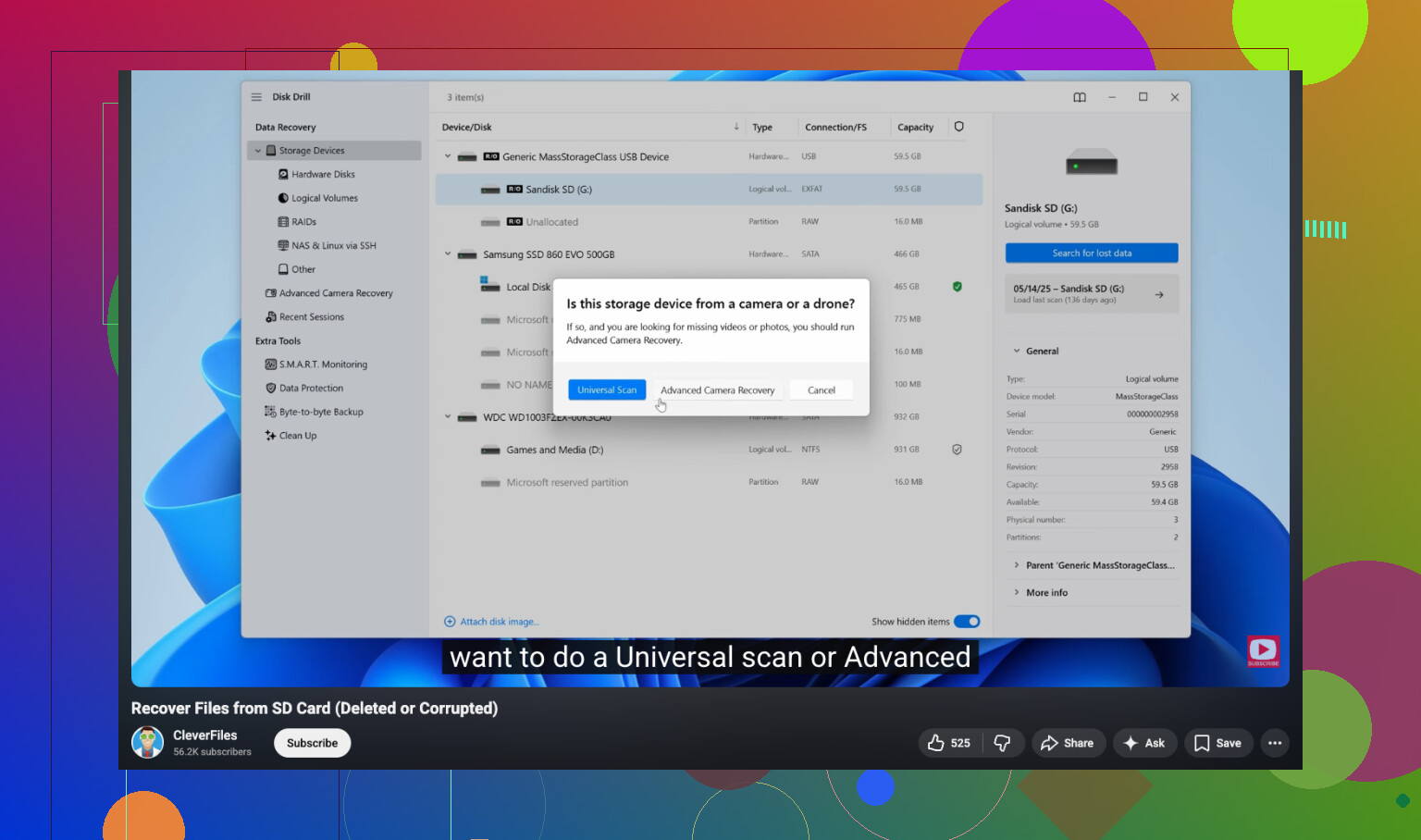
If your missing files are video from a GoPro, Canon, or a drone, this part matters more. Those devices often write video in fragments. Some apps find the pieces but fail to rebuild them into a working clip. Disk Drill has an Advanced Camera Recovery mode for this exact mess. I’ve had mixed luck with generic scanners on action cam footage, and better luck when the app knew how camera fragments were laid out. On Windows, the free tier recovers up to 100 MB, so you can test it before spending any money.
- If you need free, there is one
PhotoRec is the free unlimited option people bring up for a reason. It works. It’s also annoyng to use.
The rough parts:
- Command line interface
- No preview
- Original names are gone
- Folder structure is gone
- You end up with a huge pile of generically named files
If you only care about getting anything back, it does the job. If you want a clean, normal workflow, it feels old and messy.
You’ll also see Recuva and Windows File Recovery mentioned a lot. My experience was less great there on SD cards.
Recuva:
- Fine for simple deletes
- Not great with RAW camera formats
Windows File Recovery:
- Command line only
- Feels narrow on FAT32 and exFAT cards
- Those are the file systems most SD cards use, so this matters
- Recover to a different drive
This part trips people up. When the recovery app asks where to save restored files, pick your computer drive or another external drive. Do not write the recovered files back to the same SD card.
If you recover onto the card you’re scanning, you risk overwriting the exact sectors holding the missing photos. At tht point, you’re done.
Short version:
- Stop using the SD card
- Connect it with a dedicated reader
- Run recovery software, not repair tools
- Save recovered files somewhere else
If no new photos or videos were written after the deletion, your odds are usually decent. I’d get the card reader, run a scan, preview what turns up, and recover the keepers first.
12 Likes
They are not gone forever unless new data overwrote them. Deletion on SD cards usually removes the index entry first. The photo data often stays put for a while.
I agree with @mikeappsreviewer on one big thing. Stop using the card. I disagree a bit on one point though. If the files matter a lot, make a full image of the SD card first, then scan the image. Pros do this becuase it avoids extra wear and gives you a retry point if one tool misses stuff.
A few things people miss:
- Check the camera brand’s app or cloud sync. Some cameras auto-push JPEGs.
- Look for hidden DCIM folders and temp video folders.
- If you deleted in-camera, recovery odds are often decent. If you formatted after, odds drop, but “quick format” still leaves recoverable data on many cards.
- If the card acts weird, slow, or asks to be formatted, the card itself might be failing, not only deleted.
For software, Disk Drill is a solid pick for SD card photo recovery and deleted video recovery. I’d use its deep scan first, then sort by file type and preview results. Recover to your computer, not back to the card. If clips are broken, try a second pass with another tool after imaging the card.
Also, this guide is worth a look if you want a simple walkthrough for SD card file recovery:
step by step SD card photo and video recovery guide
If nothing shows up after a deep scan, and these are once-in-a-lifetime files, the next step is a recovery lab. Pricey, yeah, but sometimes taht’s the only move.
They’re not automatically gone forever, but I’d push back on one thing people always say: “deleted” and “recoverable” are not the only two states. Sometimes the files come back, but half the videos are corrupt, thumbnails show and full images don’t, or RAW files recover with weird names and no dates. So yes, recovery is possible, but don’t expect a perfect time machine.
@mikeappsreviewer and @vrijheidsvogel already covered the big first move: stop using the SD card. After that, I’d check something a lot of people skip: was it a normal delete, or did the camera do an in-camera format, and did you shoot anything after? That changes the odds a lot.
Also, if the photos matter a ton, check whether the card has a physical lock switch and set it before putting it in a reader. Tiny step, but it helps prevent accidental writes. Then inspect the card health too. If the card disconnects, mounts weird, or reads super slow, this may be a failing SD card situation, not just deleted files. In that case, repeated scans can make things worse.
I’m a little less enthusiastic about throwing five different recovery tools at it right away. More scans are not always smarter if the card is unstable. One careful pass is better than panic-clicking for hours. If you want the easiest route, Disk Drill is a solid place to start for SD card photo recovery and deleted video recovery because it’s easier to preview results and separate intact files from junk. That matters more than people admit.
One more thing people forget: check the camera’s internal memory too, if your model has any. Some cameras silently save there when the SD card hiccups.
If you want a very fast visual walkthrough, this SD card deleted file recovery quick tutorial is easier to follow than a wall of text.
If nothing useful appears after a proper scan, then yeah, recovery lab time. Expensive, but for wedding pics or once-ever travel stuff, sometimes that’s the move.