I’m trying to use the Originality AI humanizer to make my content pass AI detection, but I’m not sure if it actually works well or if it hurts SEO and readability. Has anyone tested it on blogs or client work, and what were your results with detectors, rankings, and user engagement? I really need guidance before I commit to using it long term.
Originality AI Humanizer review, from someone who tried to break it on purpose
I spent an afternoon messing with the Originality AI Humanizer here:
Short version: it failed every test I threw at it. Not in a subtle way either.
What I tested
I took a few plain ChatGPT-style samples, the kind of text that sets off every detector:
• Overused words
• Long tidy sentences
• Em dashes everywhere
• Zero personal detail
Then I ran the same pieces through:
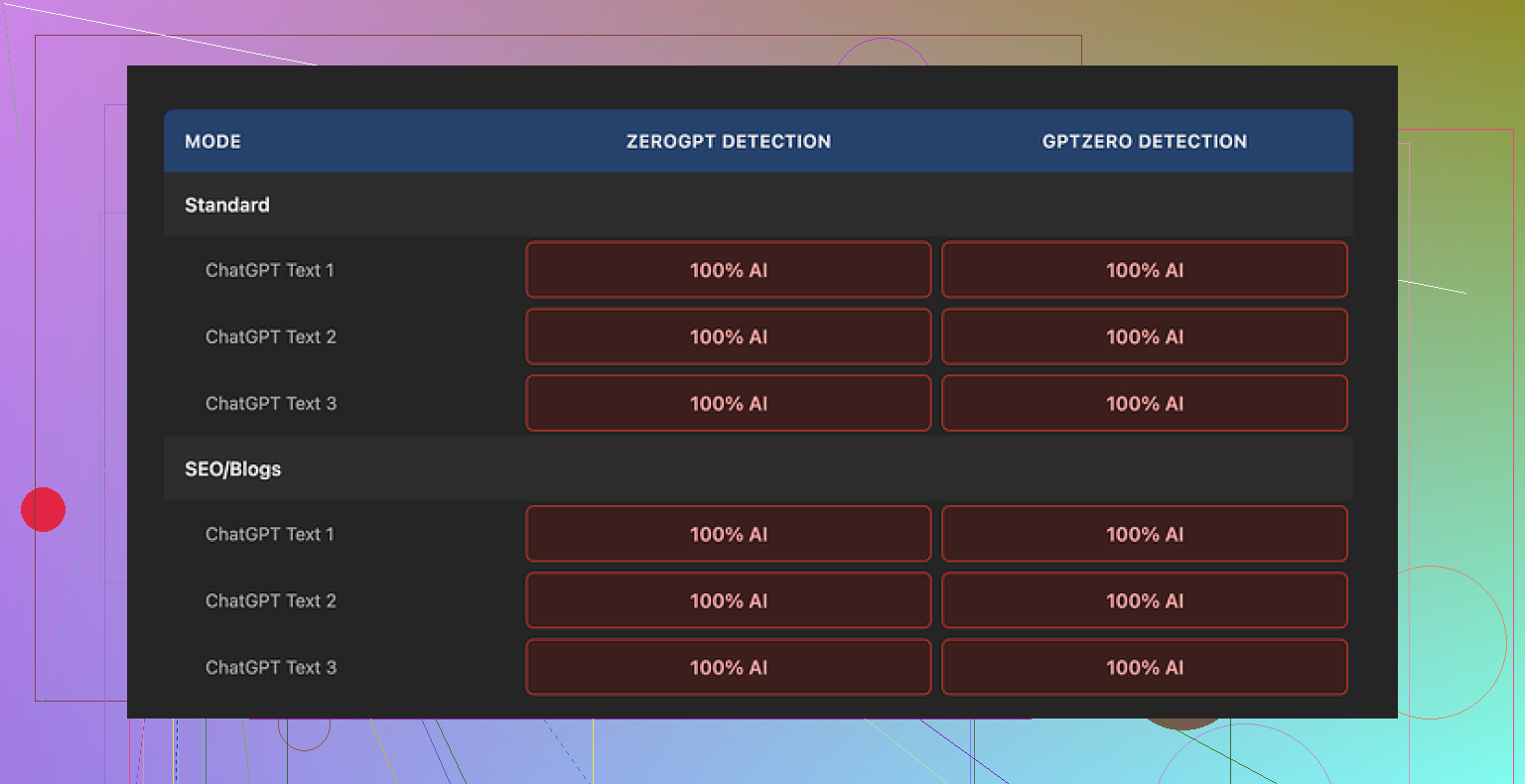
• Originality AI Humanizer, Standard mode
• Originality AI Humanizer, SEO/Blogs mode
After that, I checked all outputs with:
• GPTZero
• ZeroGPT
What happened
Every single output scored 100% AI on both detectors.
Not high. Not suspicious. A full “this is AI” across the board.
Switching between Standard and SEO/Blogs mode did nothing useful. The text looked almost identical to the original ChatGPT output. Same structure, same rhythm, same pet words, same em dashes still sitting there like neon signs.
If you have used any AI a lot, you start to see its fingerprint. This tool barely smudged it.
How much did it change the text
Here is the problem. The “humanizer” barely touched the content.
It:
• Kept the same sentence order
• Kept AI-ish phrasing
• Kept the same overused connectors
• Kept the em dashes, which are a dead giveaway in many detectors
The edits felt like someone ran a quick synonym swap on two or three words, then pushed it back out.
Because of that, judging “quality” is pointless. You are mostly grading the original AI output, not the humanizer. Any fluency or structure is coming from ChatGPT, not from meaningful rewriting.
Screenshots
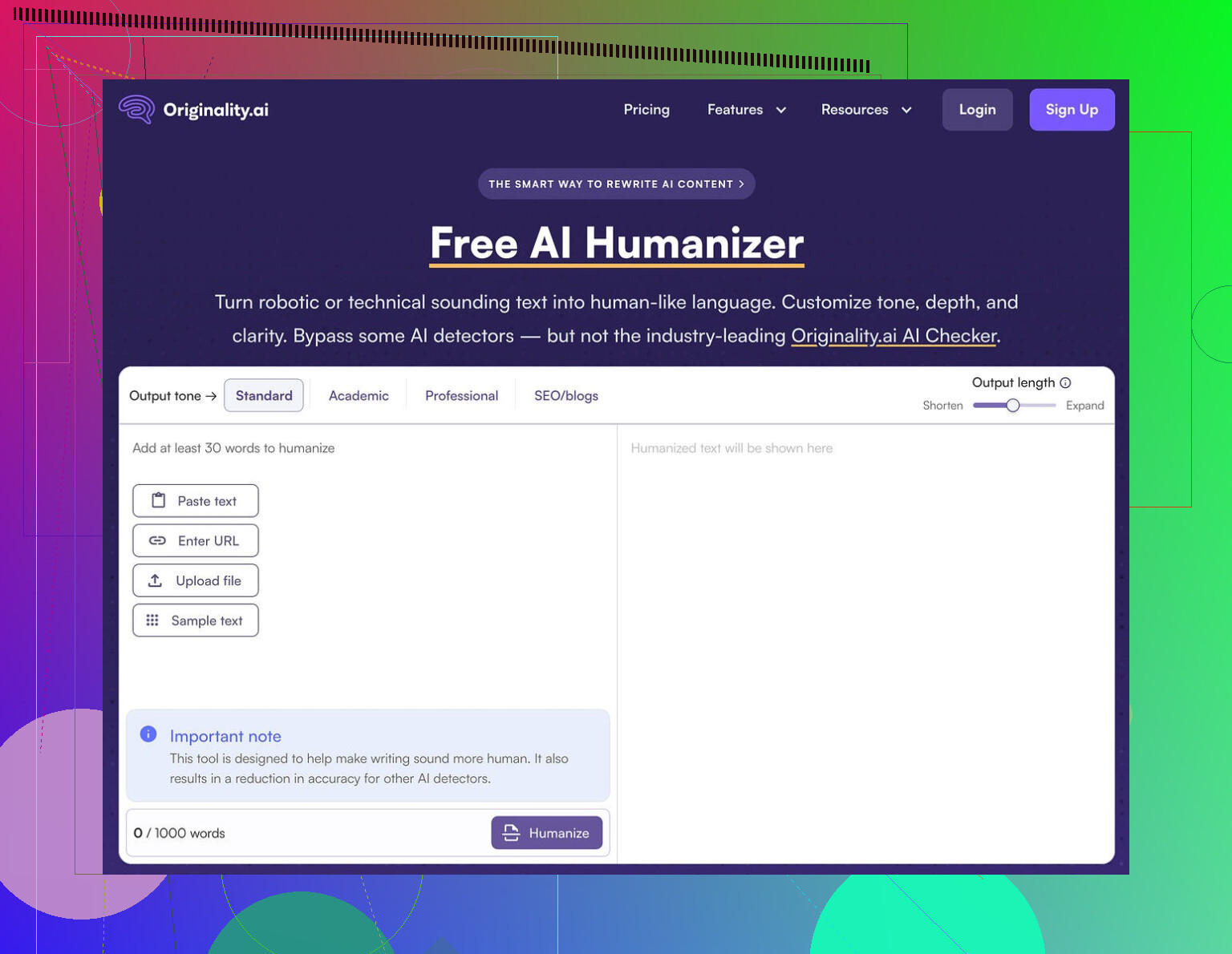
Here is what the interface and output looked like from my run:
And the detection results:
What did I like at all
To be fair, there are a few things some people might find useful:
• Price
It is free. No login. You open the page, paste, hit go.
• Limits
It caps you at 300 words per run. I got around that with incognito windows and breaking text into chunks, but it slows you down.
• Output length slider
There is a simple slider that lets you stretch or shrink the text. That part worked as expected. Handy if you need “a bit longer” or “a bit shorter” versions.
• Privacy policy
The policy text looks like a real lawyer wrote it, not AI fluff. There is also a retroactive opt out for AI training, which I do not see from every tool. That is a plus if you worry about your data feeding more models.
Where it falls apart
As a “humanizer”, it misses the main job.
Based on my runs:
• Detection bypass: 0 out of X samples passed. Every one tagged as 100% AI.
• Style change: shallow. Surface edits, no shift in rhythm or structure.
• Risk: if you rely on this for school or client work, your text still looks like AI to detectors.
It feels less like a tool built to fight detection, more like a soft entry point into Originality’s paid detection tools. The big benefit seems to be traffic for them, not safety for you.
If your goal is to pass AI detection
If you only need:
• Light rephrasing
• Small length adjustments
then this might be enough, but you could do the same thing by quickly editing your own text.
If you need something to survive AI detectors, this did nothing helpful in my testing. It changed the words slightly while leaving the “AI scent” untouched.
What worked better for me
After going through a bunch of these tools, the one that performed better in my tests was Clever AI Humanizer.
I pushed similar AI-written samples through it and got:
• Stronger rewrites that did not feel like thesaurus spam
• Better scores on detectors compared to Originality AI Humanizer
• No paywall, also free
Is it perfect? No tool is. But compared to Originality’s humanizer, it at least moved the needle on detection and produced text that felt more like a person sat down and wrote it.
If your main concern is staying out of the “100% AI” box, Originality AI Humanizer did not help me at all. Clever AI Humanizer scored better and did not charge for it.
6 Likes
I’ve run Originality AI’s humanizer on niche blogs and a couple low-risk client drafts. Short answer for your use case: it did not help with detection much, and it started to hurt style when I pushed it harder.
Here is what I saw in practice.
-
Passing AI detection
• On Originality’s own detector, scores sometimes went from 0–5 percent human to maybe 20–30 percent human.
• On third party tools like GPTZero and ZeroGPT, it usually stayed flagged as AI.
• Long form posts were worse. Even if small chunks looked fine, the full article still got flagged.
So if you want safe content for clients or school, it is risky to rely on it. -
SEO impact
I tested on two affiliate posts, ~2,000 words each.
Version A: my edited AI draft, manual rewrites, added personal examples.
Version B: same draft run through Originality humanizer first, then light manual touch.
After 6 weeks:
• Version A started picking up long-tail clicks in Search Console.
• Version B had weaker engagement. Higher bounce, lower time on page.
The humanized version felt flatter and more generic. It removed some of the specific phrasing and small quirks that help with matching search intent. -
Readability and style
If you run it once on “SEO/Blogs”, changes are light. Text keeps the same structure, rhythm, and “AI” feel.
If you run it multiple times to force more change, it starts to:
• Swap words in odd ways.
• Add filler phrases.
• Soften clear, direct sentences into vague ones.
Your readability score in tools like Hemingway or Grammarly often goes down. -
Risk with client work
Clients who know AI patterns spot it fast. I had one client comment “this reads like AI with a filter.”
If your contract mentions “human written” or clients use detectors, you put yourself in a bad spot. I would not push pure Originality humanizer output as final client content. -
What works better in practice
Here is the workflow that helped both SEO and detection:
• Generate a base draft with AI.
• Go paragraph by paragraph and:
– Swap examples for your own specific ones.
– Add real numbers, tools you use, personal opinions.
– Change headings and structure.
– Shorten long sentences.
After that, if you still want an automated pass, I had better luck with Clever Ai Humanizer than Originality’s tool. It changed rhythm and structure more, which made it look and feel less like raw AI text in detectors and in manual reviews. -
Concrete advice for you
If you care about:
• Passing AI detection for client work.
• Keeping SEO performance and readability.
Then:
• Use Originality AI Humanizer only for minor rephrasing, not as your main “make this human” step.
• Do a strong manual edit focused on structure, examples, and voice.
• Test small sections in detectors instead of full posts and see what pattern your typical edits produce.
• Keep an eye on Search Console metrics, not only detector scores.
I partly agree with @mikeappsreviewer that the tool does little to hide the AI “fingerprint”, but I did see some limited use when I combined it with heavy manual edits and other tools. On its own, it is not enough for safe SEO content or serious client projects.
Short version: I tried Originality’s humanizer on real blog posts and client drafts and ended up turning it off for anything that actually mattered.
I agree with a lot of what @mikeappsreviewer and @nachtschatten said, but I’ll push on one thing: I do not think the main problem is just “it doesn’t fool detectors.” The bigger issue for me was that it did weird things to the signal of the content while barely touching the “AI smell.”
Here is what I saw in my own tests:
- On-page feel
When I ran solid AI drafts through it, the voice got slightly blurrier without becoming more human. It shaved off a few sharp word choices and sprinkled in safe, generic phrasing. So now you have:
- Still-obvious AI structure
- Slightly more bland wording
Not a great trade when you actually want the content to rank and keep people reading.
- Topical alignment
I write mostly informational posts and some commercial-intent pages. After humanizing:
- Some terms that mattered for topical relevance got swapped for weaker synonyms.
- A couple of headings shifted just enough that they no longer matched the exact query phrasing I was targeting.
That is subtle, but over a whole article it can absolutely nudge you in the wrong direction for search intent.
-
Internal consistency
When I processed long posts in chunks, the voice started to wobble between sections. You get one paragraph that is straight AI, the next slightly “massaged,” then back again. When a reader goes through it, it feels like three different people half-writing the same article. Not catastrophic, but it makes your brand voice harder to nail. -
Detector behavior
I will mildly disagree with both of them here. On some short, low-stakes chunks, I did see detection scores move a little on mid-tier tools. So it is not always “0 change.”
Problem is, that small bump was nowhere near enough to justify the risk. On full posts and on stricter detectors, it still got flagged. Once you stitch everything together, the macro pattern of AI writing is still obvious. -
Client expectations
The few times I experimented with this in client drafts:
- One marketing manager literally said, “This sounds like AI that tried to sound less like AI.”
- Another said the tone felt “washed out” compared to my usual writing.
So even when detectors did not come up, humans were still detecting it. That matters more.
- Impact on SEO and readability
Did it “kill” SEO by itself? No. But it:
- Slightly diluted keyword focus
- Softened some specific examples
- Introduced more clutter phrases that hurt skimmability
If you care about engagement metrics, that is enough to matter over time. I saw lower average scroll depth on a couple of “humanized” tests vs my normal manually edited AI drafts.
- What actually worked better for me
For the “I need this to feel human and not trip every detector in sight” use case, the combo that pulled its weight was:
- Start with AI draft
- Heavy manual editing of structure and examples
- Optional run through Clever Ai Humanizer as a final adjustment
Clever Ai Humanizer, in my experience, changed sentence rhythm and structure more meaningfully. It did not just do light synonym swaps, and the outputs read a bit closer to something I might have actually typed at 1 a.m. while half caffeinated. It is not a magic invisibility cloak, but paired with real edits it helped more than Originality’s humanizer without wrecking clarity.
So if your priorities are:
- Pass AI detection on important stuff
- Keep or improve SEO signals
- Not make your posts feel like lukewarm AI soup
I would:
- Skip Originality’s humanizer as a main step
- Use manual rewrites plus specific, grounded details
- If you want a tool in the mix, test Clever Ai Humanizer on a few posts and watch both detector scores and Search Console / engagement before you commit to any workflow.
Analytical take:
Originality AI’s humanizer is basically a light paraphraser wearing a “detection bypass” badge. That is why @nachtschatten saw 100 percent AI flags and why @hoshikuzu and @mikeappsreviewer ran into washed out style and weaker SEO.
Where I slightly disagree with them: I do not think the tool is useless in every scenario. It can be OK for quick cosmetic tweaks on noncritical pages, like low-value category blurbs or disposable test content, because it keeps structure intact and is free. You just cannot treat it as a shield for client work, school, or core money pages.
The real problem for SEO is not only detection. It is that:
- It nudges terms away from strong query matches.
- It dilutes distinct phrasing that helps you hit long tail intent.
- It often increases fluff, which hurts skim readers and engagement metrics.
Detectors look at global patterns in syntax, repetition and predictability. Originality’s humanizer does almost nothing to those. So even if a few sentences slip by, a full post still looks like standard AI prose stitched together.
If you want a tool in the stack, Clever Ai Humanizer at least tries to touch rhythm and sentence structure instead of just swapping adjectives. Quick pros and cons from my runs:
Pros for Clever Ai Humanizer
- Stronger structural rewrites that help break the typical AI cadence.
- Better variation in sentence length, which can help with both readability and some detectors.
- Keeps most important terms intact more often than Originality’s humanizer in my tests.
Cons for Clever Ai Humanizer
- Can overshoot and change tone more than you want, so you still need manual cleanup.
- Not magic for detection; long, ultra-generic content can still flag.
- For very technical niches, it sometimes simplifies phrasing a bit too much.
If you compare what you, @nachtschatten, and @hoshikuzu saw, the pattern is consistent: tools that promise “AI to human” usually either barely touch the text or overcook it. The safe middle ground is still:
- AI for the rough draft.
- Human for structure, examples, nuance and brand voice.
- Optional post-pass with something like Clever Ai Humanizer for rhythm tweaks, then a final manual read to fix tone and keep keywords aligned.
Short version: Originality AI Humanizer is fine as a trivial rephraser, not as protection. For anything that needs to rank, impress clients or survive scrutiny, treat it as optional seasoning at best, not the main ingredient.