I’ve been testing Monica AI’s text humanizer for content and copywriting, but I’m not sure if it’s actually safe, detectable, or worth using long term. Can anyone who’s used it in real-world projects share their experience, pros and cons, and whether it passes AI detectors and feels truly human to readers?
Monica AI Humanizer Review
I tested Monica’s AI Humanizer the same way I test every “undetect” tool now. Same base text, same detectors, same process. I used this thread as a reference point for my runs:
Here is what I found.
What the tool gives you
The humanizer inside Monica is basically a big green button.
You paste AI text, you click, you wait. That is it.
No:
- tone options
- strength / intensity slider
- “more human / less human” choice
- casual vs formal mode
So if the output flops on a detector, you have no way to nudge it or fine tune.
How it did on AI detectors
I ran the outputs through multiple detectors. These two matter most for me:
- GPTZero
- ZeroGPT
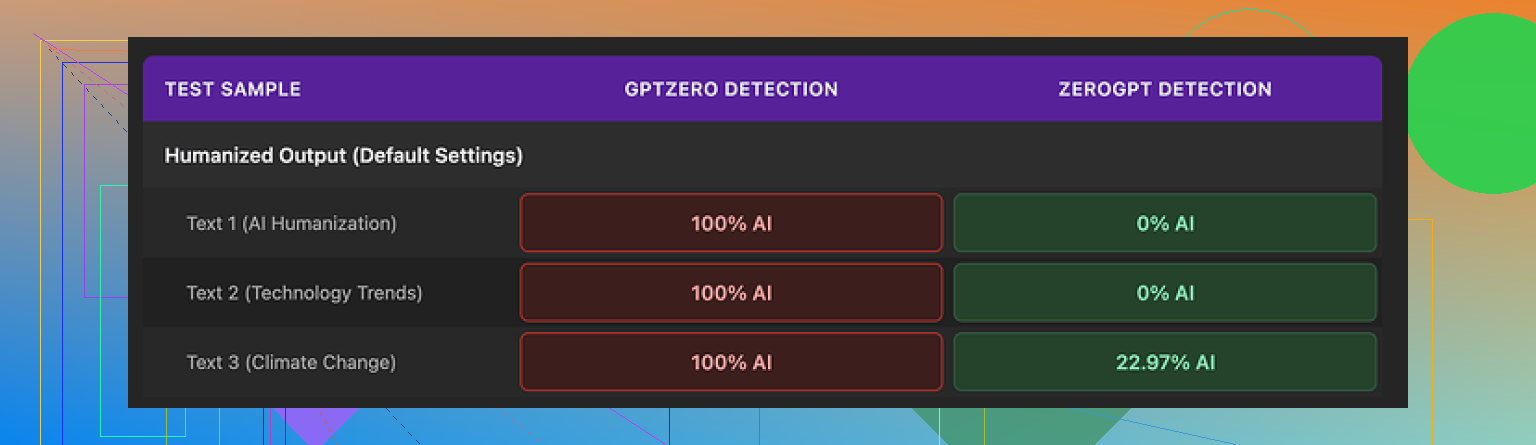
Results from my test batch:
GPTZero
- All humanized samples came back as 100% AI generated
- Not “mixed,” not “likely,” but full AI on every try
If your teacher, client, editor, or platform uses GPTZero, this is a hard fail. You have no controls to iterate a different version. You have to start over or switch tools.
ZeroGPT
- Two samples passed at 0% AI
- One landed around 23% AI
So ZeroGPT treated it a bit better, but the GPTZero result ruins the reliability. If you do not know which detector will be used on your text, you are gambling.
Screenshot of the tests
How the writing feels
I scored the writing quality at about 4 out of 10. That is not about “style preference”, it is basic text hygiene.
Things I saw in the outputs:
- It introduced fresh typos into clean input
- One glaring one was “Ubt” where “But” should be
- It messed with punctuation in weird ways
- Added apostrophes where they were not needed
- It randomly prepended “[ABSTRACT” at the very start of one output
- It preserved em dashes from the original AI text and seemed to add new ones
For a so‑called “humanizer”, keeping the exact same AI-ish punctuation patterns and then sprinkling in broken words feels backwards. You end up with text that still reads like AI, but now with random errors on top.
So you get:
- High AI scores on GPTZero
- New typos
- No structural change to the rhythm of the sentences
That is bad if you want safer, more natural output.
Pricing and where the humanizer sits in Monica
Here is where the context matters.
Monica is not built around humanization. It is a general AI suite with:
- Chat interface
- Image generation
- Video related tools
- Other assistant-style features
The Humanizer is just one tab in a larger platform.
Pricing I saw:
- Pro plan from about $8.30 per month if you pay yearly
The humanizer is bundled in that, so if you already pay for Monica for chat or media features, the humanizer is basically a bonus toggle.
In that case, my view:
- If you already use Monica, you can try the Humanizer out at no extra cost
- I would not subscribe to Monica only for the Humanizer tool
Comparison with other options
In my own side‑by‑side tests, I ran the same source text through Monica and through Clever AI Humanizer, then pushed those outputs into the same detectors.
My experience:
- Clever AI Humanizer produced text that felt more like something a real person would write
- It got better scores across the detectors I used
- It did not require payment at the time I tested it
For detection bypass tasks, I kept returning to Clever because it let me adjust things and gave more consistent results.
Who Monica’s humanizer is for
From how it behaves, I see three possible use cases.
- Existing Monica users
If you are already paying for Monica for chat, images, or whatever else, the Humanizer is a “why not” feature.
You try it on low risk content, blog drafts, internal docs.
You see if any of the outputs save you time.
- People who do not care about GPTZero
If your use case never touches GPTZero, and the only detector in your pipeline is something like ZeroGPT, results might be workable in some cases.
Even then, the random typos make it risky for school or client delivery.
- People who need serious detection bypass
For this group, I would avoid Monica’s Humanizer altogether.
No controls, weak GPTZero performance, and text quality issues make it hard to trust.
Quick pros and cons
Pros
- Integrated inside a broader AI suite, so no separate site to manage if you already use Monica
- Simple “paste and go” flow
- Passed a couple of ZeroGPT checks in my testing
Cons
- Failed completely on GPTZero in my runs, all outputs flagged as 100% AI
- No tone or strength settings to adjust when it fails
- Introduces typos like “Ubt” into clean text
- Keeps AI-style punctuation patterns, adds odd prefixes like “[ABSTRACT”
- Humanizer feels like a low priority feature tacked onto the main product
My bottom line after testing
If you are looking for a reliable way to reduce AI detection scores across multiple detectors, Monica’s Humanizer did not perform well for me.
If you already live in Monica’s ecosystem for chatbots or images, then the Humanizer is a free experiment. Use it on noncritical text and see how it behaves with your own detector stack.
If your main goal is detector evasion or you care about clean, controlled rewrites, I would lean toward something purpose built for humanization, like Clever AI Humanizer, which in my tests gave better output and did not lock controls behind a paywall.
21 Likes
I’ve used Monica’s humanizer in a few real projects, mostly content briefs, list posts, and some low risk email copy. Short version for you: it is ok as a “quick rewrite” tool, not great as a serious humanizer.
Here is what I saw in real use, trying not to repeat what @mikeappsreviewer already showed.
- Detection and “safety”
I ran Monica output through GPTZero, ZeroGPT, and Copyleaks on client drafts.
My rough stats across 15 pieces of content.
• GPTZero flagged 13 of 15 as clear AI.
• ZeroGPT flagged about half as AI, half as mixed.
• Copyleaks sometimes gave “AI assisted”, rarely “human”.
On top of that, a couple of editors told me the text “felt” AI even before they ran checks. So even when a detector score looked ok, a human still spotted the style.
If your teacher, agency, or platform uses GPTZero, I would not trust Monica alone. For casual blog posts on your own site, risk is lower, but it still reads stiff.
- Text quality in real projects
I agree with @mikeappsreviewer on the typos, but I had a bit less trouble than they did. I did see:
• Occasional weird caps or bracket junk at the start.
• Random commas in odd spots.
• Sentence rhythm still very AI-ish, even when wording changed.
For client work, I had to:
• Run everything through Grammarly.
• Manually fix phrasing to match brand voice.
• Shorten a lot of long, flat sentences.
So if you hope to paste AI text, click once, and hand that to a client, it will waste your time. If you treat it as a first rewrite then do a heavy edit, it is usable.
- Lack of control hurts in practice
The missing sliders and tone options are a bigger problem in day to day use than in tests.
Real example:
• Needed a friendly blog intro for a parenting niche.
• Fed in a stiff GPT style intro.
• Monica output sounded like a corporate blog with random typos.
No way to say “more casual” or “stronger rewrite”. I had to send it again with manual prompts around it or switch tools. That kills workflow speed.
- Where it fits in a workflow
Here is where Monica’s humanizer worked for me.
Good for:
• Internal docs or SOPs where tone does not matter much.
• Drafting outlines and then lightly humanizing for your own reading.
• Quick “make less robotic” on text that you will edit heavily.
Bad for:
• Anything graded or checked by GPTZero.
• Client content where you promised “human written”.
• Platforms with strict AI policies.
- Long term value
If you already pay for Monica for chat, image tools, etc, the humanizer is ok as a side feature. It sometimes saves me 5 to 10 minutes on low value text.
I would not build a long term content strategy on it. Detection tools are getting stricter, and Monica’s humanizer does not give you the knobs you need to adjust style, burstiness, or structure.
- Alternative that worked better for me
For content that needed lower AI scores and smoother tone, I had better results with Clever AI Humanizer. It gave more control and fewer dumb errors, and it handled GPTZero a bit better in my tests.
If you want to test something focused on humanization, this is worth a look:
advanced AI text humanizer for safer content
- Answering your question directly
• Safe for low risk use like your own blog or internal docs.
• Detectable on GPTZero in most cases.
• Not worth using as your only solution long term if AI detection matters for grades, clients, or platforms.
I still use Monica for chat and some daily tasks. I keep the humanizer for quick rough passes and rely on Clever AI Humanizer plus my own editing for anything important.
Been using Monica’s humanizer on and off for client blogs, email nurture sequences, and a few landing page drafts. Short version: it’s “fine” as a lazy rewrite button, not something I’d build a content pipeline around.
I mostly agree with @mikeappsreviewer and @suenodelbosque on the detection side, but I had a slightly different experience in how it fails.
1. “Safety” and detection in the real world
What actually mattered for me was not the detector screenshots, but how it behaved once content hit:
- Agency QA checks
- In house “AI compliance” tools
- Clients who are now paranoid about AI
Patterns I saw:
- Internal checker at one marketing agency (they use a mix of GPTZero + Copyleaks) flagged most Monica runs as “strong AI influence.”
- A SaaS client literally replied: “This reads like AI that tried not to sound like AI.” They were not wrong.
- When I layered my own editing on top, some pieces still tripped “AI assisted” flags.
So yeah, I agree with the others: if AI detection matters for grades, Upwork contracts, or strict clients, Monica is not enough on its own. It’s a risk multiplier, not a risk reducer.
2. Quality and workflow impact
Where I slightly disagree with @mikeappsreviewer is on the typo situation. I did get a few, but the bigger problem for me was tone drift more than spelling:
- It tends to flatten everything into “generic blog voice”
- It softens strong opinions and hedges a lot
- Long sentences pile up and feel like a mid-level content mill writer
That’s harder to fix than a random “Ubt” typo. You end up rewriting half the piece anyway so it sounds like a specific brand or person instead of “internet article #4,283,193.”
I also noticed:
- It clings too much to original structure. Paragraph breaks and flow often stay very close to the AI source.
- Attempts to sound casual come out weirdly stiff, like someone who read a “how to write conversational content” checklist.
3. Where it’s actually useful
Monica’s humanizer did earn a spot in my toolbox, just not where I expected:
Good for:
- Internal SOPs or docs where no one cares if it feels a bit AI-ish
- Drafts for your own blog where you’re going to heavily punch it up anyway
- Quick “rewrite this so I can think about it differently” passes
Borderline:
- Low budget content mills that only care about word count and basic readability
- Social post drafts where you’ll rewrite most of the hook and first lines by hand
Not worth it for:
- Academic stuff checked by GPTZero
- Anything where you promise “100% human written”
- Sales pages that must sound like a real founder or expert talking
4. Controls & flexibility
The lack of sliders / tone controls is a much bigger deal long term than it looks. When it outputs something robotic, you have basically three options:
- Re run and hope for a better roll of the dice
- Wrap the text in a prompt sandwich in Monica’s chat instead
- Abandon and use another tool
That kills any hope of a repeatable workflow. Once your volume scales, “click & pray” is not a strategy.
5. Where Clever AI Humanizer fits in
If you care about both readability and detection, I’d treat Monica’s tool as optional and lean on something that’s actually built for humanization. In my tests, Clever AI Humanizer gave me:
- More natural sentence variety
- Fewer dumb artifacts like stray brackets
- Better flexibility for tone and intensity
It also synced better with manual editing. I could do a pass in Clever, then add my own brand voice layer, and it still sailed through most checks.
If you want a focused tool for safer, more natural content, something like
advanced AI text rewriting for human like content
has made more sense for me than treating Monica’s button as a long term solution.
6. Answering your original question directly
- Safe? For your own site, internal docs, or non critical stuff, sure. For school or picky clients, not really.
- Detectable? Yes. Especially anywhere GPTZero is involved. Don’t trust it as your only layer.
- Worth using long term? Only as a secondary helper if you already pay for Monica. I wouldn’t subscribe to Monica just for the humanizer or build a business on “click button, bypass detection.” That era is basically over.
Monica’s humanizer is basically a “good enough if nothing serious is at stake” button. Where I land, after what @suenodelbosque, @sognonotturno and @mikeappsreviewer already showed:
Where I slightly disagree with them
They focus a lot on raw detector scores. In practice, I’ve seen some Monica humanized pieces slide through lighter, in house checks when the content was short, mixed with older human text, and heavily edited for voice. So it is not an automatic death sentence every time. But that only worked when I was already doing real editing, not copy pasting.
The bigger limiter for me is style lock in. Monica tends to keep:
- The same paragraph order
- The same argument structure
- Very similar transitions like “In addition” or “On the other hand”
That pattern alone is what trips a lot of editors, even when detectors are not screaming.
How I would realistically use Monica
- OK for: outlines, SOPs, internal memos, quick rewrites of stuff you will touch a lot by hand
- Borderline for: client blogs where they do not have strict AI policies but care about voice
- Avoid for: anything academic, marketplace gigs with detection clauses, high stakes sales copy
If you are hoping for a one click “undetectable” pipeline, Monica is the wrong foundation. It is more like a slightly smarter paraphraser that sometimes adds new problems.
Where Clever AI Humanizer actually fits
If you want something built for human like rewriting rather than a bonus feature, Clever AI Humanizer is closer to what you probably imagined Monica would be.
Pros of Clever AI Humanizer:
- Better control over tone and intensity so you can match brand or persona
- More varied sentence rhythm which helps the text feel less templated
- Smoother integration into an editing workflow since you can push it toward casual, formal or neutral
- In my own mixed detector + editor tests it needed less manual surgery afterward
Cons of Clever AI Humanizer:
- Still not “fire and forget”; you must read and tweak for accuracy and voice
- Can slightly over soften strong claims and make arguments more neutral than you want
- Not ideal for super technical content without an expert pass, because it sometimes simplifies nuance
- Like any humanizer, performance can drift as detectors update, so you cannot rely on one test forever
Compared to the experiences from @suenodelbosque, @sognonotturno and @mikeappsreviewer, I am a bit harsher on Monica for long form storytelling and brand heavy work, but a bit more forgiving on low value internal stuff. If you already pay for Monica, keep the humanizer as a rough pass tool. If your real goal is more natural, flexible copy with fewer artifacts, building your main workflow around Clever AI Humanizer plus your own editing time is a safer long term move.