I accidentally formatted my SD card and lost important photos and videos I really need to get back. I stopped using the card right away, and I’m looking for the best SD card data recovery steps or tools that might help recover formatted files without making things worse.
Take a breath first. I messed this up once with an SD card after a shoot, and my stomach dropped the same way. I hit format when I meant to remove one bad clip. It looked fatal. It wasn’t.
Most SD cards in cameras, drones, phones, and PCs get a quick format. What usually happens is simple: the file map gets wiped, and the storage gets marked free. The photos and videos often stay on the card until new data lands on top of them.
So the first move is boring but important. Stop using the card now. Don’t shoot more photos. Don’t record more video. Pull the card out. If it has a lock switch on the side, slide it to locked. I did this late once, and I lost part of a clip. Learned it the dumb way.
You’ll need a computer and recovery software. Skip CHKDSK, Terminal tricks, Command Prompt fixes, all of it. Those tools repair file system issues. They don’t recover data from a formatted card in the way you need here.
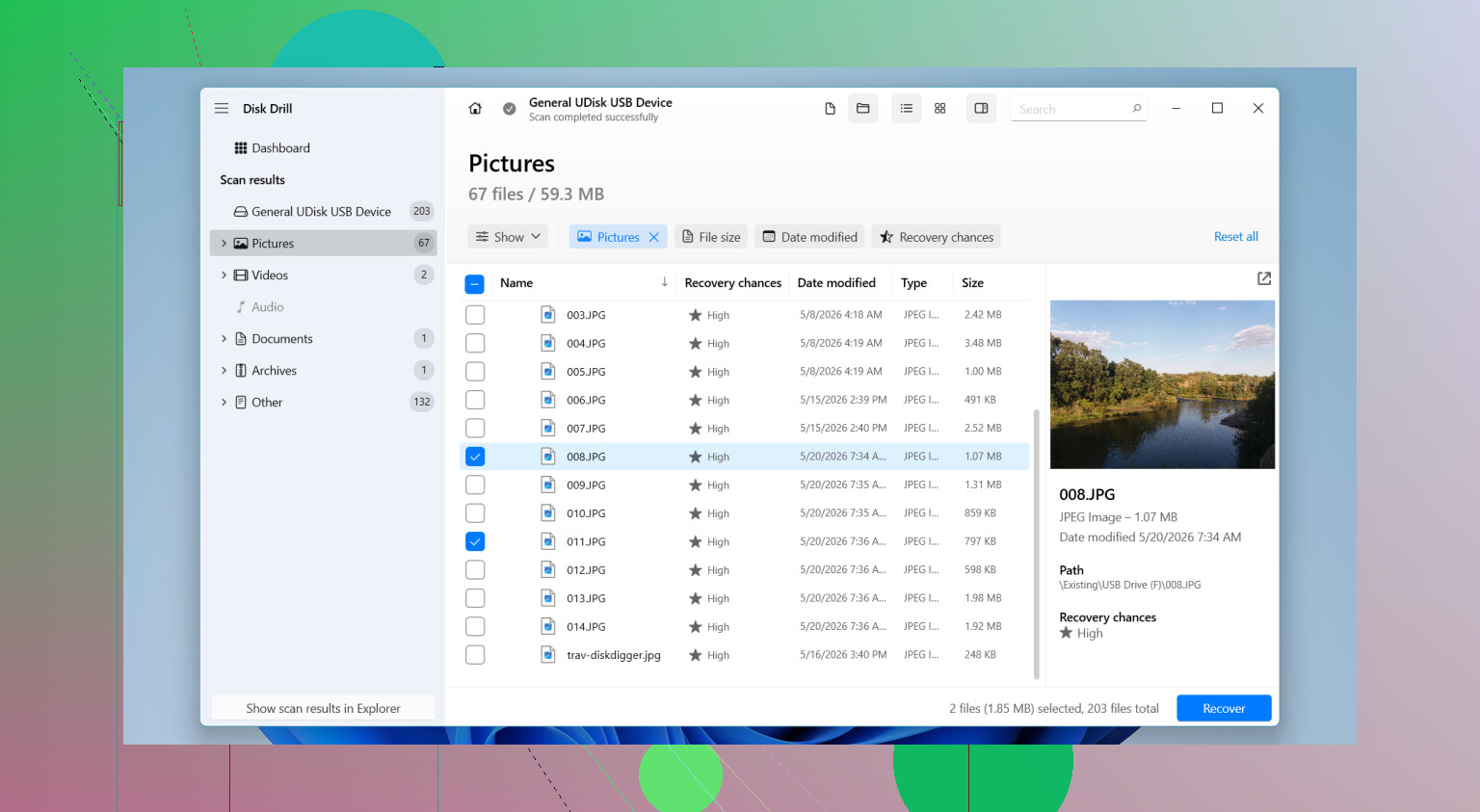
What worked best for me was Disk Drill. I had better results with camera and drone footage there than with the free stuff I tried first. Video files are where a lot of tools fall apart, esp if the clips were fragmented. You get files back, sure, but they glitch out or won’t open. Disk Drill’s Advanced Camera Recovery handled those cases better for me. The preview feature helped too, since I didn’t want to recover a pile of dead files.
If you want a free route, PhotoRec is still worth a shot. It works. It’s ugly. The interface feels old, and file names plus folder structure usually come back scrambled or missing. If you’re restoring hundreds of clips, sorting later gets annoying fast.
What I’d do, step by step:
- Put the SD card in a card reader and connect it straight to your Mac or Windows PC.
- Install the recovery app on your computer, not on the SD card.
- Scan the formatted card.
- If videos are missing and the app offers a camera-specific recovery mode, use it.
- Preview files before restoring them.
- Save recovered files to a different drive, never back to the same SD card.
If nothing new has been written to the card, your odds are decent. Leave the card alone, scan it from a computer, and recover to another drive. That’s the part which matters most.
39 Likes
You did the most important part already. You stopped using the card.
I agree with @mikeappsreviewer on that. I disagree a bit on one point, though. PhotoRec is fine for old JPG batches, but for mixed photo and video jobs it turns into a mess fast. Lost names, no folders, tons of sorting. If your files matter, time matters too.
My order would be this:
-
Make a full image of the SD card first.
If the card is failing, repeated scans make things worse. Tools like USB Image Tool on Windows or dd on Mac/Linux work. Recover from the image, not the card, if possible. -
Check what type of format happened.
Quick format often leaves more recoverable data.
Full format lowers the odds a lot, esp on SDXC cards formatted exFAT. -
Use a recovery tool with preview and video support.
Disk Drill is a solid pick here. Better interface, easier filtering, and it tends to do well with deleted or formatted SD card recovery. For photos, many apps perform ok. For MP4 and MOV files, fewer do. -
Recover to your computer or an external drive.
Do not save anything back to the SD card. That part ruins recoverable data. -
If the card was used in a camera after format, stop expecting 100%.
One new 4K clip can overwrite a lot. A few photos, less damage. Size matters.
Also, skip phone apps for this. Use a card reader on a PC. More stable, fewer permissions issues.
If you want a clean walkthrough, this easy SD card recovery guide for formatted photos and videos is worth a look.
Short version, image the card first, scan with Disk Drill, preview, restore elsewhere. That’s the safest route imo.

Big thing nobody mentioned enough: check where the format happened. If the SD card was formatted in a camera, phone, GoPro, or drone, that device may have used a specific file system layout. Sometimes the best recovery app is the one that recognizes media signatures from that device, not just generic deleted files.
I agree with @mikeappsreviewer on avoiding write activity, but I slightly disagree with @cacadordeestrelas on imaging first as a universal rule. If the card is healthy and reads fine, some people waste hours fumbling with imaging tools they don’t understand. If you’re not technical, a direct read-only scan on a stable card reader is often faster and less screw-up-prone. If the card disconnects, throws errors, or gets hot, then yeah, make an image first.
A few extra checks:
- Look at card capacity in Disk Management or Disk Utility. If it shows the right size, that’s a decent sign.
- If the card asks to be formatted again, don’t click anything.
- Try a different USB card reader before assuming the card is dead. Cheap readers are weirdly awful lol.
- If the files are super important, don’t keep testing 8 apps. Every extra action increases risk of mistakes.
For tools, Disk Drill is probly the easiest starting point because it can sort found files well and preview recoverable photos/videos before you restore. That matters more than people think. R-Photo is another one worth testing for photos if you want an additional option, and DMDE is powerful if you can handle a less friendly interface.
One more thing: if the SD card was encrypted by the phone or camera, normal recovery can get ugly fast.
If you want more context, this discussion on recovering photos and videos after accidentally formatting a 128GB microSD card is pretty relevant.
One small disagreement with @cacadordeestrelas and @jeff: if the card is stable, I would first check whether your camera made a hidden backup folder or split clips across weird vendor folders before running recovery. Sometimes people think “formatted” means nuked, but some devices only rebuilt the directory and left recoverable structure behind.
What I’d add:
- Test the SD card in a second reader first
- Check SMART or read errors if your adapter supports it
- Recover the most important file types first, not everything at once
- Sort by original signatures like JPG, CR3, NEF, MP4, MOV
About Disk Drill:
Pros:
- easy previews
- good filtering
- handles formatted SD card scans well
- decent for mixed photo/video recovery
Cons:
- not the cheapest option
- deep scans can be slow
- recovered filenames may still be generic after a format
PhotoRec is still good for brute-force recovery. DMDE is stronger if you know file systems. R-Photo is nice for photos. Disk Drill is the easiest middle ground for most people.
Also, if this was a full format on an SD card used in Android as internal storage, recovery odds drop hard.
Try backups before recovery software. Open Google Photos, iCloud Photos, OneDrive, Dropbox, or your camera maker’s app. Search by the shoot date. Check Trash, Recently Deleted, Archive, and import folders.
On Windows, inspect Pictures and OneDrive\Pictures. On Mac, open Photos and Recently Deleted. Also check every laptop previously used with the card.
Photo apps often copy files during imports, sometimes without much notice. You might find all photos and clips within minutes, with original names and dates intact. Do this first, becuase it avoids risky scans and alot of sorting.
Check the cloud backups @cybercraft5486hq mentioned before you even touch recovery software, that alone might save you the whole headache. If nothing turns up there, then run a read-only scan with something like Disk Drill and recover to another drive. No point risking the card if your camera app already quietly synced everything.