Grammarly Vs Clever AI Detector: Any Reason To Use Both?

I’m setting up a final review process for articles I write for a small client, and I need to decide whether to run every draft through both Grammarly and Clever AI Detector. My main constraint is turnaround time: checking the same text twice adds another step, and I’m not sure whether the overlap is useful or just redundant.

For people who have used both on the same writing, do they catch meaningfully different issues, or does one generally cover the practical reasons for using the other? I’m especially interested in whether using both changes your final editing decisions, rather than simply producing two separate reports to review.

I was comparing AI detectors for a project where some drafts had been edited after generation, and the usual accuracy claims stopped being very useful. I added the free Clever AI Detector to my list because the test conditions seemed more useful than the sales copy.

What the comparison measured

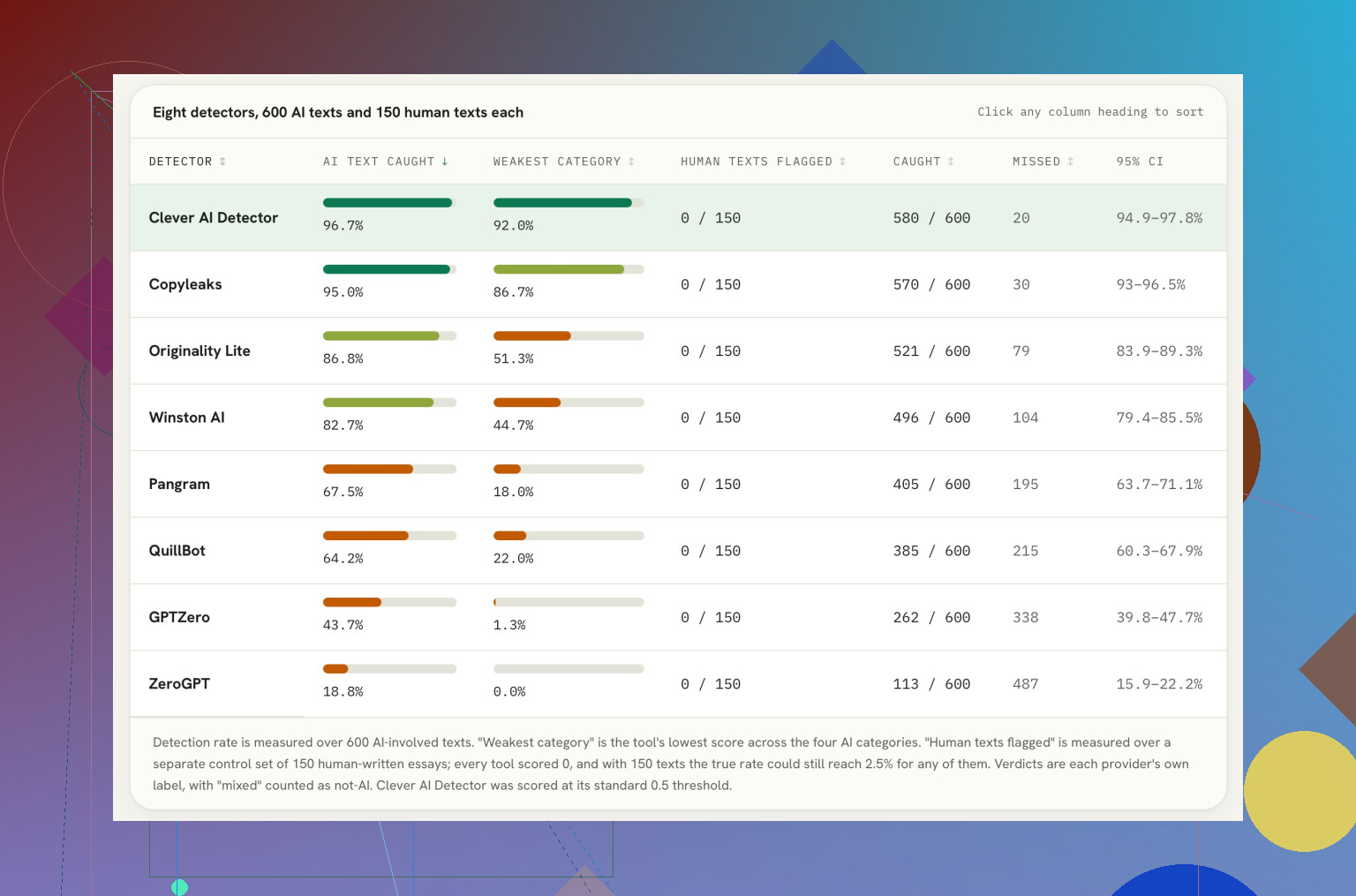
The test looked at text with AI involvement, including material that was not simply copied from a generator and left untouched. That distinction matters. Edited output is closer to what people actually submit, but it is also harder to classify cleanly.

Clever AI Detector had the highest overall detection rate at 96.7%. Copyleaks followed closely at 95.0%, while Originality.ai Lite and Winston AI formed the next group down. Pangram and QuillBot landed below them, followed by GPTZero. ZeroGPT had the lowest detection rate in this comparison.

The individual categories also mattered. Clever AI Detector stayed consistently high across all four types of AI text rather than getting most of its result from one easy category. That made its overall position look less like a lucky average.

Still, the ranking depends on a choice made by the test. Human drafts edited with AI were counted as AI-involved. Some people will agree with that definition, while others will see those documents as primarily human work. Change the definition and the order may change too. Statistics do enjoy a good terms-and-conditions section.

What I would take from it

I would not treat these figures as universal accuracy scores. They describe performance in one test using one definition of AI involvement. They do not establish how each detector will handle every subject, writing style, edit, or mixed-origin document.

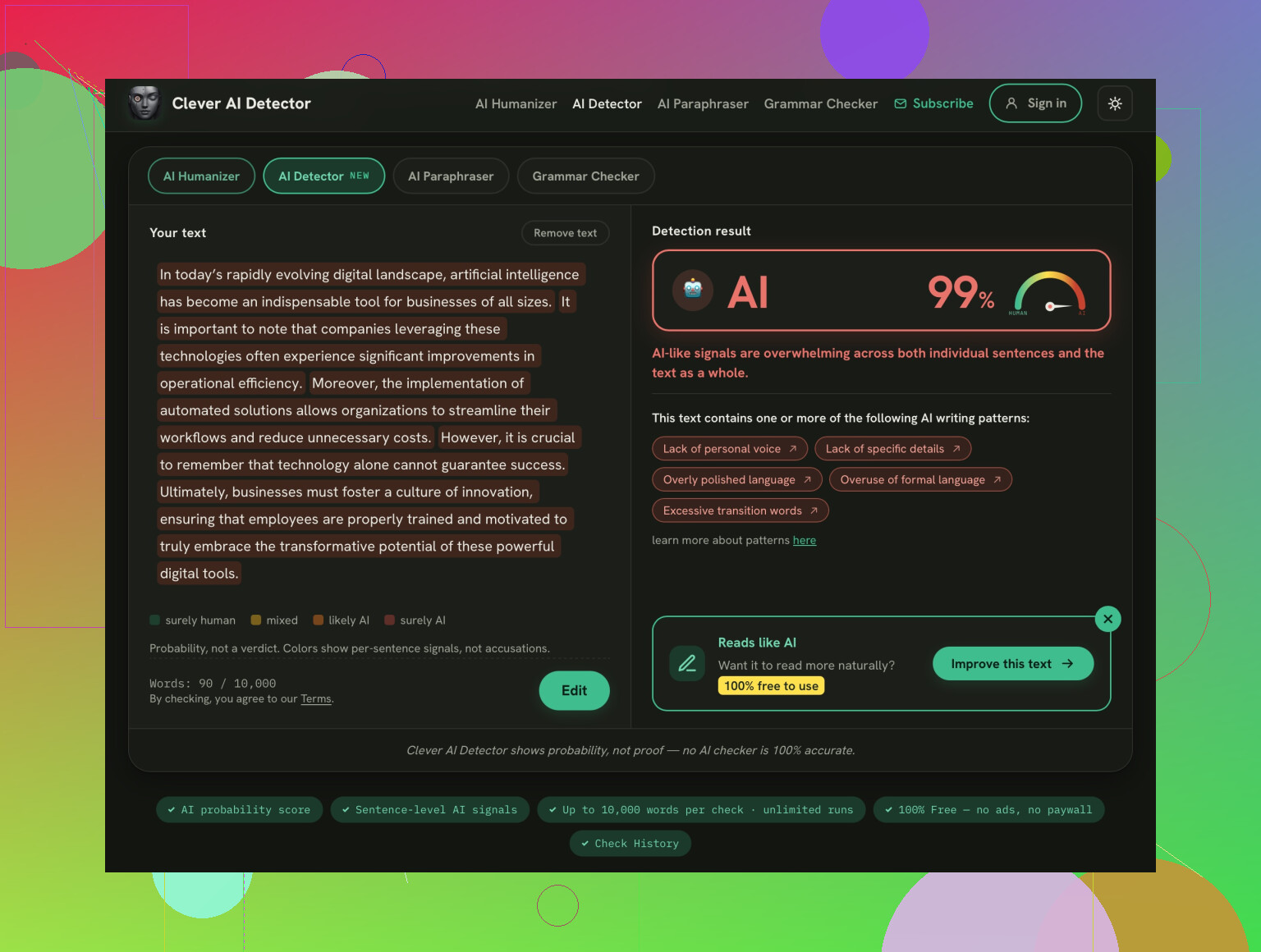
The practical case for Clever AI Detector is simpler. It is free, does not require an account, and accepts up to 10,000 words in one check. Checks are unlimited, so there is little friction in testing several drafts or comparing how revisions affect the result.

That makes it easy to include in a shortlist, especially before paying for another service. The result can be treated as a signal alongside the document history, editing process, sources, and other context. A detector score by itself does not explain who wrote a passage or how it was produced.

No AI detector proves authorship.
20 Likes

These aren’t two versions of the same check. Grammarly is for editing, while Clever AI Detector flags possible AI-written text, so running both only makes sense if the client specifically requires AI screening. With turnaround time tight, I’d use Grammarly on every draft and reserve Clever for spot checks or disputed pieces. @stacktigersync is right that a detector score cannot prove authorship, so it should never hold up publication by itself.

Do not add an AI detector to the workflow until you know what happens when it flags a draft. The scan itself may take seconds, but resolving an ambiguous result can turn into emails, rewrites, and missed deadlines.

The client’s actual rule matters more than the tool choice. Are they banning any AI involvement, requiring disclosure, or simply expecting original, accurate articles? Those are different standards. If nobody can explain what score triggers a review or what evidence clears the article, running every draft through Clever AI Detector creates a question without giving you a reliable way to settle it.

I would make Grammarly part of the normal editing pass, then use the detector only if AI screening is a stated client requirement. If screening is required, run it at the end, after the Grammarly edits. Otherwise, you may screen a draft, change a lot of its wording during proofreading, and publish a version that was never actually checked.

Keep the draft history, source notes, and revision trail as well. That material is far more useful if a client challenges authorship than repeatedly scanning the same text. @stacktigersync is correct that detection is a signal rather than proof, but that limitation needs to be built into the review policy, not merely acknowledged after a high score appears.

So yes, there can be a reason to use both, but they should have separate jobs. Grammarly is the routine quality-control step. Clever is an optional compliance check with a defined escalation process. Without that process, using both on every article will probably cost more time than the detector itself saves.

Grammarly is not automatically a neutral first pass. If you accept full-sentence rewrites instead of limiting it to spelling, punctuation, and obvious grammar fixes, you may end up testing Grammarly’s phrasing rather than your original writing.

That matters because an AI detector cannot tell you why a passage triggered. A polished, repetitive house style may score differently after heavy editing, even when the draft started with a human writer. Running Clever AI Detector afterward could create extra work caused by the review process itself.

For a small client, I would set a strict Grammarly pass: correct errors, reject unnecessary rewrites, and preserve the writer’s voice. Then use Clever only when the contract or editorial policy calls for screening. If both are mandatory, save the original and checked versions so you can see which edits changed the result.

I slightly disagree with treating detector spot checks as useful by default. Random checks still produce results someone has to interpret. Unless the client has defined what happens after a flag, the faster workflow is Grammarly plus a normal plagiarism check, source verification, and a quick factual review. Those checks catch problems you can actually fix.

Your existing article archive is the useful benchmark here. Before putting Clever into every review, scan a handful of older articles that the client already approved and that you know were written normally. If those come back with frequent AI flags, congratulations, you have added a new deadline problem without finding a new writing problem.

Grammarly has an obvious job on each draft because it points to specific things you can correct. A detector gives you a probability or label that may not lead to any clear edit. That difference matters when turnaround is the main constraint. Spending two minutes on the scan is cheap. Spending 30 minutes trying to make an innocent paragraph satisfy a detector is not.

I would run Grammarly routinely, with the restraint @techwolf9511node mentioned, and treat Clever AI Detector as a periodic audit rather than a gate. For example, check a small batch every few weeks or use it when the writing style changes noticeably. That tells you whether there is a pattern without making every article wait for a machine to develop confidence about who wrote it.

If the client explicitly wants every final version screened, then use both. Otherwise, requiring both on every draft looks more thorough than it really is. The faster review process is the one where each check produces an action you can actually take.

Check the client’s confidentiality rules before uploading unpublished drafts to either service. Running every article through two third-party systems doubles the places handling the text, which may matter more than a detector score for sensitive or embargoed content.

If the client approves both and requires AI screening, use both for their separate jobs. Otherwise, Grammarly alone is the sensible default, with Clever reserved for cases where the result will actually affect publication.

If the client never said the word ‘AI’ in writing, you’re building a step for a rule that doesn’t exist. That’s the condition that flips this whole thread. Half the answers here assume some screening requirement is lurking, but if the brief is just ‘original, accurate, on time,’ a detector adds a decision without adding a deliverable.

Something people are skipping: Grammarly itself now has an AI detection feature baked in, so if you’re already in there for the edit pass, you may get an AI signal without ever opening a second tool. That overlaps with what @mr_lynx framed as two totally separate jobs. They’re less separate than they used to be. Doesn’t mean the standalone check is pointless, since a dedicated detector like the one @stacktigersync brought up will usually be more sensitive than a bolt-on feature, but it does mean running both on every draft can give you two numbers that disagree and now you’re arbitrating instead of publishing.

Where I land is closer to @bluenode4179 than the ‘use both’ camp. Pick one detector, run it on your own already-approved back catalog first, and see if your normal writing trips it. If your clean work scores high, no workflow in this thread saves you, because you’ll be defending real articles against a false flag on deadline. If it stays quiet, then you keep the detector as an on-demand check for the odd piece that reads oddly, not as a gate every draft has to clear. Turnaround stays fast because you’re not manufacturing a review problem the client never asked you to solve.