I went looking for CCleaner for iPad and realized it is not available, so now I am trying to find a good alternative for cleaning up storage, removing junk files, and improving iPad performance. I am not sure which iPad cleaner apps are safe or actually worth using, and I would really appreciate recommendations from anyone who has found a reliable option.
If you’re trying to find a CCleaner-style app for iPad, the short version is this.
CCleaner doesn’t have a real iPad app. There’s an iPhone version, but on iPad it runs in compatibility mode and feels off, like nobody sat down and checked how it behaves on a bigger screen.
The other thing is more important. iPadOS blocks the kind of deep cleanup people know from CCleaner on Windows. No app gets access to system junk, app cache across the device, registry-type cleanup, or Safari internals. Apple keeps a lid on all of it. So the part you’re able to clean on an iPad is mostly your own stuff, photos, videos, screenshots, large media. For most people, that’s where the storage went anyway.
What people on iPad seem to use instead
When I kept seeing this asked in app threads and iPad forums, one name showed up over and over, Clever Cleaner.
The reason is pretty simple.
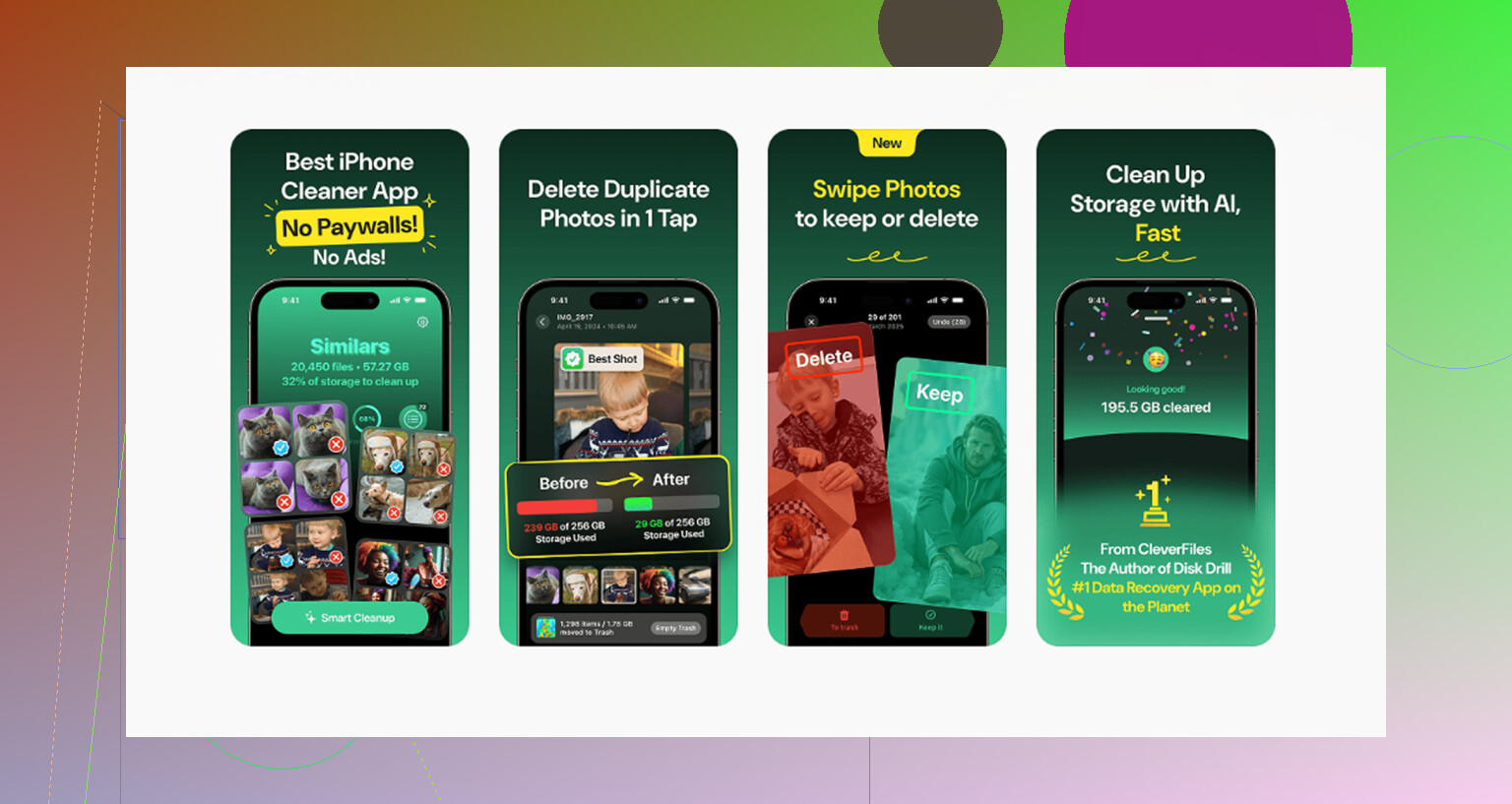
It has a proper iPad version. It doesn’t throw ads at you. It doesn’t stop you at the last step and ask for money before deleting anything. And the photo grouping is sharper than what CCleaner usually does, even when CCleaner is on its paid side.
I’ve seen a lot of people land on it after the usual cleaner app routine, free install, scan your library, then the app blocks cleanup behind a subscription screen. This one skips all of that. You open it, the features are there, done.
Does it deal with duplicate photos well
Yeah, this is the part where it pulls ahead.
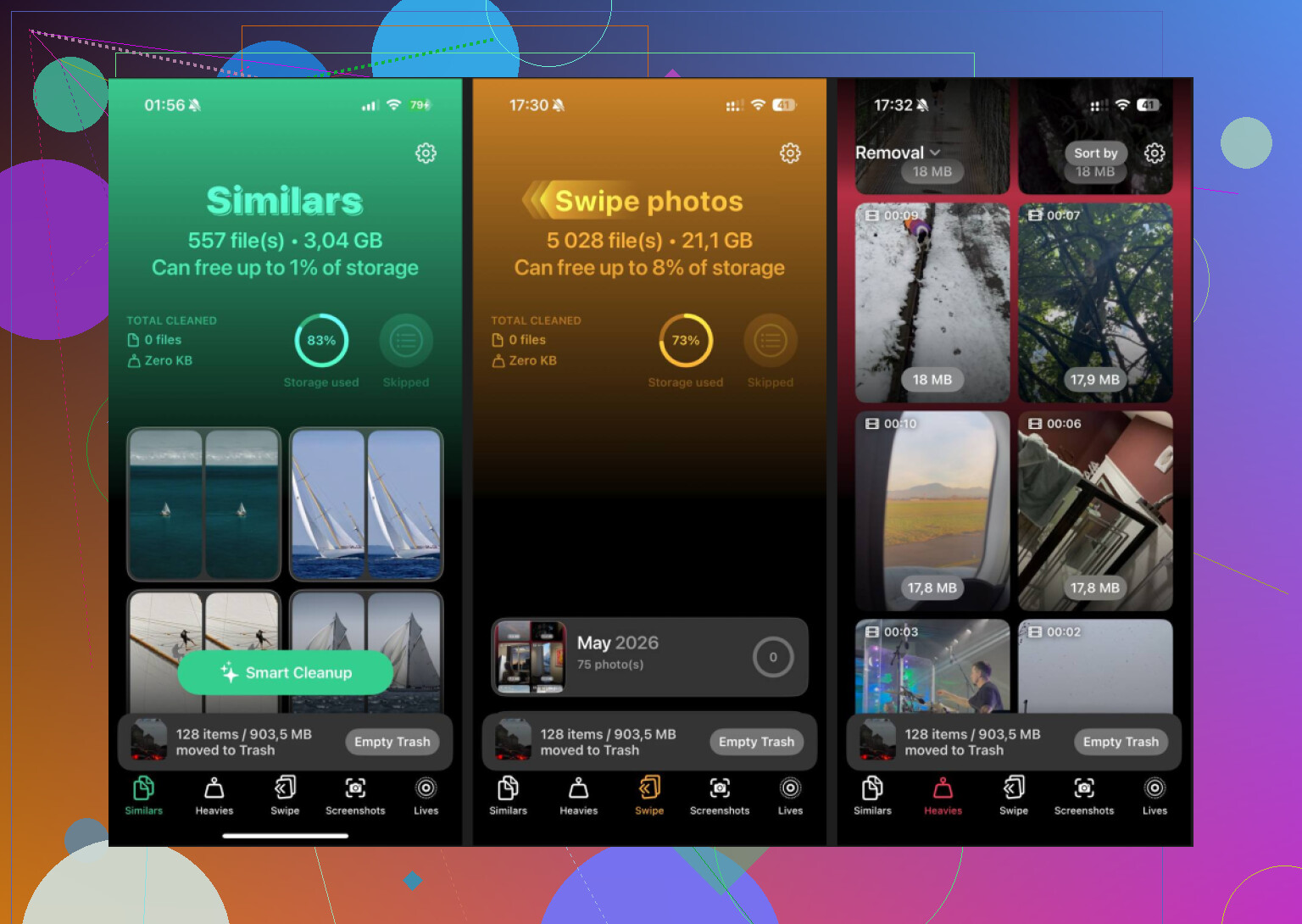
The Similars section doesn’t only look for exact duplicate files. It scans for near-matches too. So if your library has:
- ten burst shots of the same person
- four photos of the same receipt
- six attempts at the same sunset with tiny angle changes
- repeat pictures with different exposure or focus
it groups them together.
Then it marks one as the Best Shot and lets you wipe the extras fast.
That matters more on iPad than people think. A lot of iPads end up holding years of family photos, downloaded images, school stuff, screen recordings, random AirDrop dumps. Once the library gets big, manual cleanup turns into a slog.
CCleaner, from what I’ve seen, tends to be loose with “similar” matches. It will toss unrelated photos into the same pile often enough that you stop trusting it and start checking every item by hand. At that point, the time savings are gone. Clever Cleaner seems tighter there. Fewer weird matches. Less babysitting.
Other parts worth using on iPad
The Heavies tab is useful in a blunt way. It sorts media by file size, biggest first, and shows the exact size on each item.
If your storage vanished because of a few 4K clips, long screen recordings, downloaded movies, or giant edited exports, you see the problem fast. No hunting.
The Screenshots section is the same kind of practical. Every screenshot shows its size before deletion. You know what you’re removing and how much space you’re getting back.
That sounds small, but it helps. A lot of apps hide the useful part behind vague labels like “clean 2.3 GB of junk,” then make you guess what they meant. Here it’s plain.
Privacy side, all processing stays on the device. Nothing goes out to some remote server for scanning. If your iPad has work files, personal photos, IDs, invoices, or kid pictures, I’d count that as a big plus.
About the free part
From what I saw, yes. Free means free here.
No ads stuffed between scans. No paywall before deletion. No subscription screen popping up after the app finds clutter. That’s rare in this category, and I say that after trying enough of these apps to get annoyed by the pattern.
One thing to keep expectations in line
No app on iPad can do the full PC cleaner routine.
It won’t touch system files.
It won’t clear Safari internals for you.
It won’t scrub the OS.
It won’t remove hidden junk from other apps across the system.
Apple doesn’t allow that.
So if your goal is media cleanup, duplicate photos, large videos, screenshots, then Clever Cleaner covers the useful part. For everything outside that, you still need to go into Settings > General > iPad Storage and handle it yourself.
If you want to clean up more than media without paying, a simple mix seems to cover most of the mess people run into:
- Clever Cleaner for photos and videos
- Easy Cleaner for duplicate contacts
- Cleanfox for old newsletter subscriptions
That setup gets through most of the clutter people complain about on iPad, and you don’t need to spend money to do it.
14 Likes
CCleaner is the wrong thing to chase on iPad. iPadOS does not let apps do the Windows-style junk sweep people expect. So if you want more space and smoother perfomance, focus on what fills storage first.
My take is a little different from @mikeappsreviewer. I would not bother stacking 3 cleanup apps unless your mess is split across photos, contacts, and email. For most people, one good media cleaner plus Apple’s own storage screen is enough.
What people are using instead:
-
Clever Cleaner
Best pick if your iPad storage is packed with photos, duplicates, similar shots, screenshots, and huge videos. It has a real iPad layout, which matters more than people think. A lot of “iPhone cleaner” apps look awkward on iPad. -
Built-in iPad Storage
Go to Settings, General, iPad Storage.
This shows which apps eat the most space, offload options, and large attachments. It is more useful than most “cleaner” apps for app bloat. -
Files app cleanup
Downloads folder, On My iPad, old ZIPs, exported PDFs, video edits. People forget this stuff and it adds up fast. -
Safari manual cleanup
Settings, Safari, Clear History and Website Data.
No cleaner app gets special access here anyway.
If you want a quick explainer before picking one, this iPad cleaner app review for freeing up storage and removing duplicate photos covers the idea well.
Short version, Clever Cleaner is the closest thing to a CCleaner alternative for iPad, but only for media cleanup. For system junk, there is no true iPad equivilent. Apple does not allow it.
Honestly, I think people chase the wrong thing when they look for “CCleaner for iPad.”
@mikeappsreviewer and @mike34 are right that iPadOS blocks the deep-clean stuff, but I kinda disagree with the idea that you need a whole toolkit unless your device is a total digital junk drawer. Most “slow iPad” issues are just low free space, overloaded Safari tabs, bloated apps, or an aging battery, not magical hidden junk files.
What I’d use instead:
- Clever Cleaner if your storage is mostly photos/videos
- Delete and reinstall giant apps like TikTok, Instagram, Discord, Netflix downloads, etc. This often clears app cache better than any cleaner can
- Restart the iPad once in a while. Boring, but it helps more than people admit
- Check Messages attachments. For some reason people forget this and it can eat gigs
- Turn off Background App Refresh for apps you don’t care about
Also, “performance boost” apps on iPad are mostly marketing fluff. iPad isn’t Windows. No app is out here scrubbing secret system garbage lol.
If you want a quick outside read, this detailed Clever Cleaner review for freeing up iPhone and iPad storage gives a decent breakdown of what it actually does.
So yeah, if you want the closest practical CCleaner alternative for iPad, Clever Cleaner makes sense. If you want true system cleaning, that app just does not exist on iPad rn.