I accidentally deleted a full photo shoot from my CF card before backing it up, and I’m trying to find out if the images can still be recovered. This was an important session, and I need help with the best CF card photo recovery steps or software to avoid making the loss worse.
I went through this once with a CompactFlash card, and the first move was boring but important. Stop using the card. Right now. Don’t stick it back in the camera, don’t take a couple “test” shots, don’t copy anything onto it, and don’t run random repair tools because a forum post told you to. If the files vanished, the card might still hold the old data, it’s often the file table or directory info that stopped pointing to it. The bad part is simple, new writes can overwrite the missing stuff and then your odds drop fast.
If your computer still sees the CF card, I would not freak out yet. Detection is a good sign. It means software recovery still has a shot, sometimes a pretty good one. I had better results when I pulled the card out immediately and worked from a reader on a computer instead of messing with it in-camera.
If there’s no backup, I’d start with software. My pick for this kind of thing is Disk Drill. I used it because it was easy to sort through found files without fighting the UI for an hour. It handles FAT32 and exFAT, and it recognizes common camera formats, including RAW files from Canon, Nikon, and similar gear. The preview part matters more than people think. Seeing the image before recovery saves time and stops you from restoring a pile of junk.
What I would do, step by step:
Take the CF card out of the camera and leave it out.
Plug it into your computer with a proper CF card reader.
Install Disk Drill on your computer, never on the CF card.
Open the app and pick the CF card from the list of drives.
Run a full scan, not a half-hearted quick pass if the files matter.
Wait for the scan to finish. Yeah, it drags sometimes.
Open the found files section and start checking previews.
Mark the photos, videos, or docs you want back.
Recover them to your computer or a different external drive.
Do not put recovered files back onto the same CF card.
That last bit is where people mess up. If you save recovered files back to the same card, you risk overwriting other missing files you haven’t pulled off yet. I’ve seen people do this once and then wonder why half the shoot came back corrupted. rough lesson.
If you want other options, there’s a decent list of data recovery software. PhotoRec is free and it does pull files off cards, but it’s rough around the edges. You usually lose original names and folder structure, so you end up sorting a pile of files by hand. R-Studio is strong too, though I found it heavier and more technical than I wanted for a straight photo recovery job. For a normal missing-files CF card case, I’d still start with Disk Drill and only switch if it comes up short.
There’s also a point where I would stop trying software and hand it off. If the card is not detected on any machine, if the pins are bent, if it gets hot, if it disconnects over and over, or if the files are irreplaceable, skip DIY. A recovery lab costs more, yep, but with physical damage or one-time photos, I wouldn’t gamble.

20 Likes
Yes, deleted photos from a CF card are often recoverable if you stopped shooting right away. Deleting usually removes the file index first. The image data stays until new files overwrite it. If you took more photos after the delete, recovery odds drop a lot.
I agree with @mikeappsreviewer on one part. Keep the card out of the camera. I’d add one thing. If the photos matter a lot, make a byte-for-byte image of the CF card first and scan the image, not the original card. Tools like USB Image Tool, Win32 Disk Imager, or ddrescue work for this. It takes extra time, but it gives you one safe master copy.
For software, Disk Drill is a solid pick for CF card photo recovery because it handles FAT32, exFAT, JPG, and many RAW formats well. If you want a second opinion after one scan, try another app on the image file, not on the card itself. Different scanners find differnt files.
One small disagreement. I would run a quick scan first, then a deep scan. Quick scan sometimes preserves names and folders.
If your card mounts but asks to format, don’t format it. If it shows 0 bytes or drops offline, stop DIY.
For more tips on choosing the best CF card photo recovery software, this video is useful:
how to recover deleted photos from a memory card

Yep, there’s a real chance you can recover them, but I’d be a little more cautious than @mikeappsreviewer and @hoshikuzu on one thing: if this shoot is truly irreplaceable, don’t spend all day trying five different tools on the original card. One or two careful attempts, then escalate.
Deleted CF card photos usually aren’t gone instantly. The camera often just removes the file references. Actual image data can stay there until something overwrites it. So if you havn’t shot anything else on that card, your odds are way better.
My take:
- don’t use the CF card again
- don’t format it, even if the camera asks
- avoid “repair” options in Windows or macOS
- recover to a different drive only
I do agree Disk Drill is a solid place to start for CF card photo recovery. It’s easy to sort by image type, preview recoverable JPG/RAW files, and it tends to do well with camera cards. If the card is readable, that’s probly the least annoying option for most people.
One thing I’d add that wasn’t stressed enough: check whether your camera did a normal delete or an in-camera format. A simple delete is often easier to recover from. A full format, especially on newer cameras, can get uglier fast.
Also, if Disk Drill finds files but previews are broken, that usually means partial overwrite or file system damage, not neccessarily total failure. Try recovering the RAWs anyway.
If you want a helpful discussion on CF card and memory card photo recovery, this post is worth a look: CF card photo recovery tips for deleted camera images.
If the card disconnects, isn’t detected, or has bent pins, stop DIY stuff. At that point software is mostly wishful thinking.
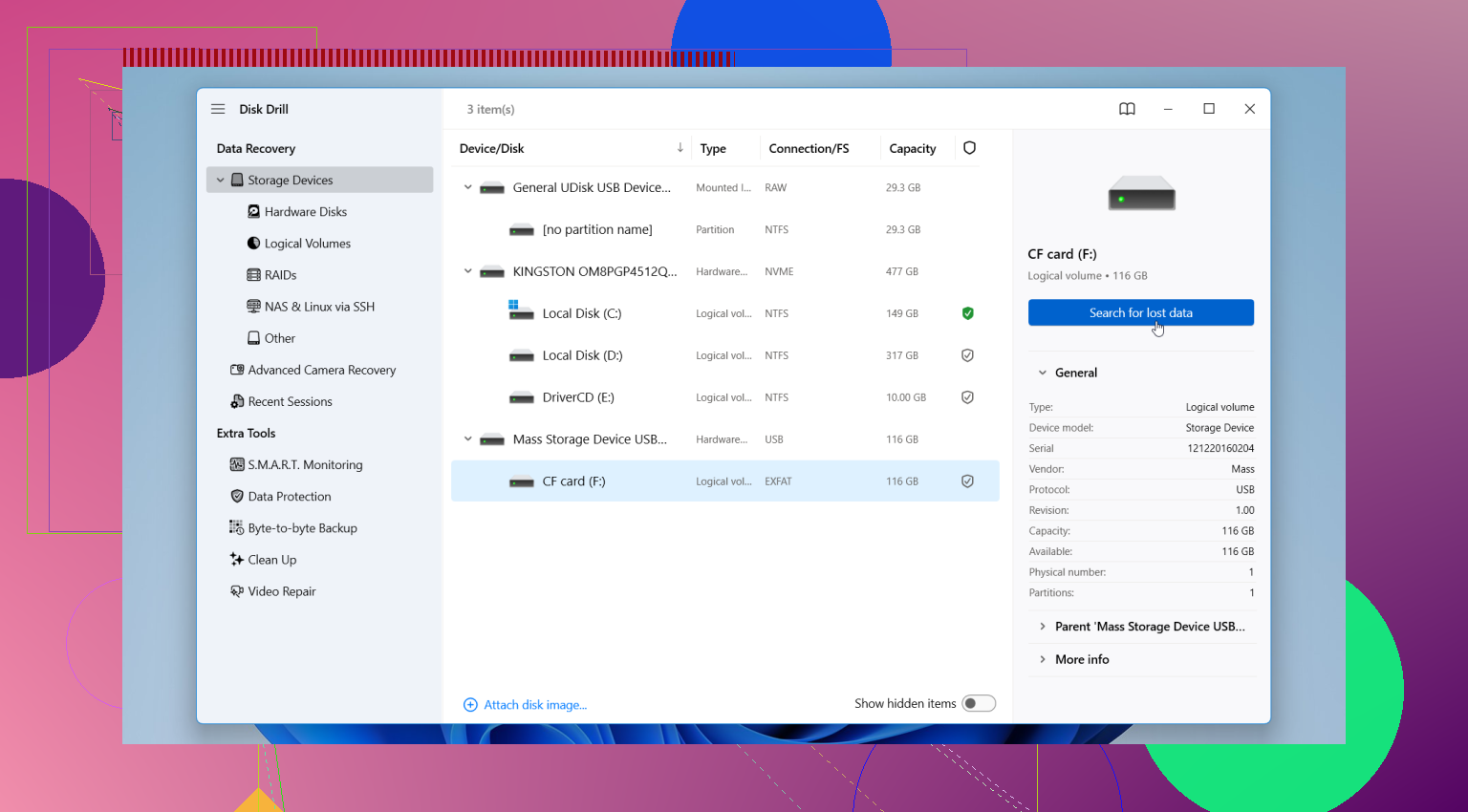
Best odds if it was just deleted and not reformatted. I slightly disagree with the “deep scan first” vibe above. For camera cards, I like checking the file system state before throwing heavy scans at it, because some cameras only clear directory entries and a lighter pass can recover cleaner results.
Where I agree with @hoshikuzu, @nachtschatten, and @mikeappsreviewer: stop using the CF card completely.
Extra thing to check that they did not really dig into: whether the card was in FAT32 or exFAT, and whether your camera writes sidecar or database files. Sometimes recovered RAWs look incomplete, but the image is fine and only metadata got lost.
Disk Drill is a reasonable option here.
Pros:
- easy previewing of JPG and many RAW files
- good at memory cards
- simple filtering, which matters when hundreds of images appear
Cons:
- deep scans can return lots of renamed files
- not always the cheapest route
- if the card has hardware issues, software won’t save you
My approach would be: image the card if possible, then test one scan in Disk Drill, and only recover a handful first to verify integrity before restoring everything. If the first recovered samples open correctly in Lightroom or your RAW editor, then pull the rest. If they do not, switch tools or go to a lab before stressing the card further.