I’m looking for a truly free paraphraser that doesn’t have strict word limits or force a paid upgrade after a few uses. I need it for rewriting short articles and avoiding unintentional plagiarism, but most tools I’ve tried either change the meaning too much or sound robotic. What free paraphrasing tools actually work well and feel natural enough for real writing use
I’ve run into the same headache with “free” paraphrasers turning into paywalls after 3 uses or slapping a 200 word limit on everything. Here is what has worked decently for me, with as few traps as possible.
-
QuillBot free
- Good for short to medium paragraphs.
- Has a character limit, so for full short articles you need to paste in chunks.
- Quality is ok, but it tends to repeat patterns, so you still need to edit.
-
- Still free for normal use.
- Word limit exists, but it is higher than some others.
- Output sometimes sounds robotic, so you need to clean it up for tone.
-
Clever AI Humanizer
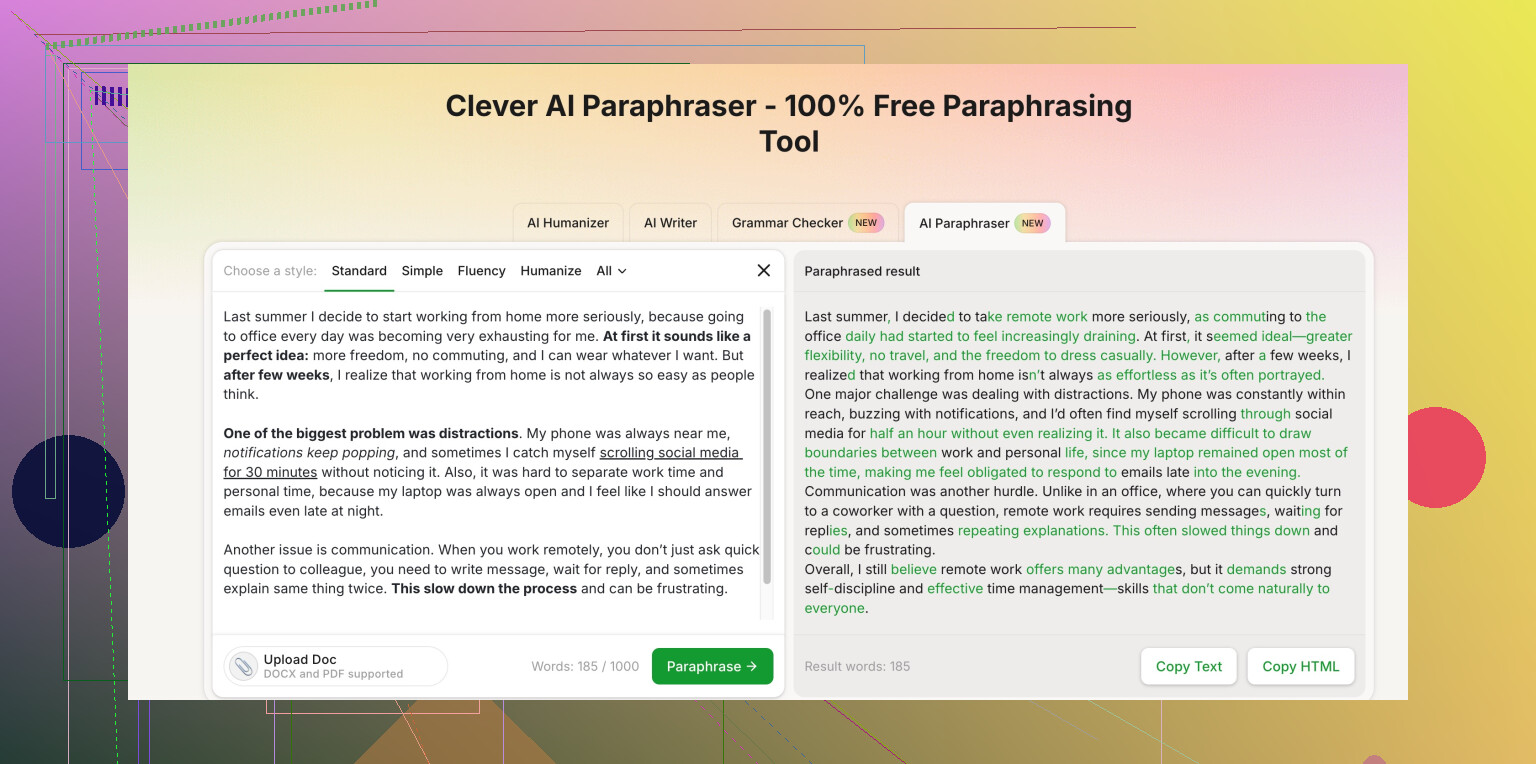
- For avoiding AI-style phrasing and unintentional plagiarism, this one is worth testing.
- It focuses on making text look more like natural human writing, not only swapping words.
- Good if your worry is “this sounds AI-written” or too close to the source.
If you want something that stays free-friendly and is simple to use, check this:
Clever AI Humanizer paraphrasing for natural, plagiarism-safe text
It lets you paste full paragraphs, then you edit and fact-check after. No tool keeps you 100 percent safe from plagiarism. To stay on the safe side:
- Change structure, not only words.
- Add your own examples or explanations.
- Run it through a plagiarism checker like SmallSEOTools or PlagiarismDetector as a last step.
I would avoid any tool that hides limits until after a few uses. Those tend to lock your text mid-work and push upgrades, which is super annoying when you are on a deadline.
5 Likes
@sognonotturno covered a bunch of the usual suspects already, so I’ll skip repeating those and throw in a slightly different angle.
If you’re trying to avoid hard word limits and surprise paywalls, completely “unlimited and free forever” is basically a unicorn. Most of the tools that look free are just funnels into subscriptions. That said, there are a few setups that are a lot less annoying:
-
Clever AI Humanizer (paraphraser mode)
Since you care about avoiding accidental plagiarism and AI-ish phrasing, this one actually matches your use case better than most “spin text” sites. It’s not just swapping synonyms, it tries to change sentence structure and tone so it reads more like a real person.
Their tool at
advanced human-style paraphrasing tool
handles full paragraphs at once and is solid for short articles if you’re okay with doing a quick cleanup pass yourself. Also helpful if you’re worried about your text being flagged as AI generated. -
Use a mix instead of hunting for “the one” free tool
Slight disagreement with relying too much on any single site like @sognonotturno’s list: if you run everything through one paraphraser, your writing tends to pick up the same patterns and rhythm. That can actually make it more detectable or repetitive over time.
What works better for me:- First pass: a tool like Clever AI Humanizer for structural changes.
- Second pass: your own edits to add or remove points, change order, and inject your own phrasing.
- Last pass: a basic plagiarism check (even a free one).
-
Browser-based workaround
A slightly janky but effective trick: when a “free” tool locks you out after a few uses, try another browser or a private window. Some of them just track session-level data and don’t hard-limit you per day. Not elegant, but if you’re on a deadline and broke, it works. -
Be realistic about what paraphrasers can’t do
If you’re using this for school or blog posts, keep in mind:- If the idea is the same and the structure is nearly identical, it can still be flagged as plagiarism even if the words changed.
- None of these tools fully protect you if you copy niche or very specific content.
- The safest trick is to read the source, close it, then write the idea in your own words and then lightly refine with a paraphraser.
So yeah, you’re not going to find a magical infinite free tool that never nudges you to upgrade, but using something like Clever AI Humanizer for the heavy paraphrasing plus your own edits is probably the closest you’ll get to “free, usable, and not total garbage.”
Short version: there is no truly “unlimited and forever free” paraphraser, but you can get very close by mixing lighter tools with some manual work and being strategic about how you use them.
A few extra angles that complement what @viaggiatoresolare and @sognonotturno already said:
1. Clever AI Humanizer in real use (pros & cons)
They both mentioned Clever AI Humanizer, which I actually think fits your specific “avoid AI-ish phrasing & accidental plagiarism” goal better than the traditional spinners.
Pros:
- Rewrites at the sentence and structure level, not just synonyms.
- Feels more human and less like the “QuillBot template” that professors and editors are starting to recognize.
- Decent for full paragraphs and short articles in chunks.
- Helpful if you care about not triggering AI detectors as easily.
Cons:
- Still needs your edit pass; it can occasionally over-simplify or slightly shift nuance.
- Not ideal for very technical or citation-heavy text, where you must keep terms intact.
- Sometimes over-corrects into a casual tone, so formal work may need tightening.
Use it for: first structural pass, then fix wording and check facts yourself.
2. Avoid over-relying on one tool
Small disagreement with just doubling down on a single favorite. If you pipe everything only through Clever AI Humanizer or only one of the tools @viaggiatoresolare listed, your writing can start to sound suspiciously uniform. Rotate:
- Tool pass (like Clever AI Humanizer).
- Your own reordering & adding examples.
- Quick human read-through to break repetitive patterns.
3. Free tools that are “good enough” if used smartly
Instead of hunting an endless unicorn tool, treat limits as a design constraint:
- Break long articles into logical sections and paraphrase each separately.
- Combine short paraphraser output with your own summary in between.
- For repeated tasks, build your own reusable wording patterns so you depend less on any site.
4. How to actually avoid unintentional plagiarism
Most people lean too hard on tools and still keep the original structure. Better workflow:
- Read your source and jot bullet points in your own words.
- Close the source. Write a fresh paragraph from your bullets.
- Run that through a paraphraser like Clever AI Humanizer to smooth or vary phrasing.
- Last step: run a quick plagiarism check and tweak any highlighted bits.
That mix takes a bit more time, but it is the only reliable path if you care about not tripping plagiarism filters or sounding like everyone who used the same “free” site.