My iPhone has been lagging a lot lately with slow apps, delayed typing, and occasional freezing, but I really do not want to erase all my data with a full reset. I have already tried basic steps like restarting it, and I need help finding other ways to speed it up without losing everything. Looking for the best fixes for iPhone lag, slow performance, and freezing issues.
Watching a pricey phone choke on stuff like typing, swiping, or opening Messages gets old fast. I ran into it too, and I would not jump straight to wiping the phone. A full reset is usually the big hammer people grab too early.
If the slowdown started right after an iOS update, give it a few days
This part trips people up. After a bigger iOS install, the phone often spends hours, sometimes a couple nights, doing cleanup work in the background. It reindexes photos, rebuilds app data, and sorts out system files for the new version. While it does all of this, the phone feels off. Keyboard lag. Choppy scrolling. Apps taking an extra beat to open.
What helped me was boring stuff. I left it plugged in overnight on Wi-Fi for two or three nights. I also restarted it once. In my case, the weird lag eased off without any deeper fix.
If you are still getting lag after a week, I would stop blaming the update itself.
Storage is usually the first thing I check
This is the one I see most. iPhones need open space to breathe. Not only for photos and apps, but for temp files iOS writes while stuff is running. Once free space gets too low, the whole phone starts dragging. You notice it in places where it feels stupid, keyboard delay, app launch slowdown, random pauses.
From what I have seen, staying above roughly 10 to 20 percent free space helps. Dip under that, and things start getting ugly.
Photos are often the mess
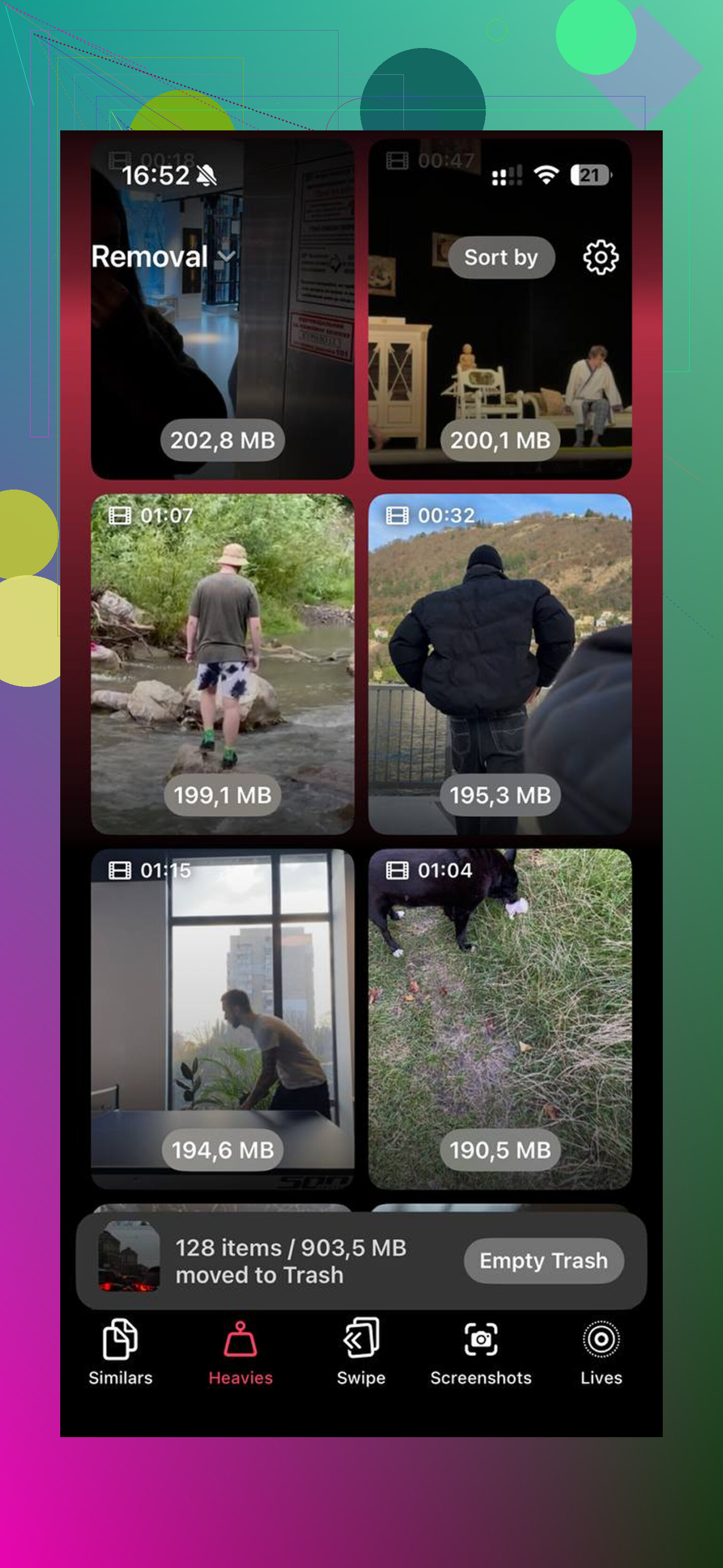
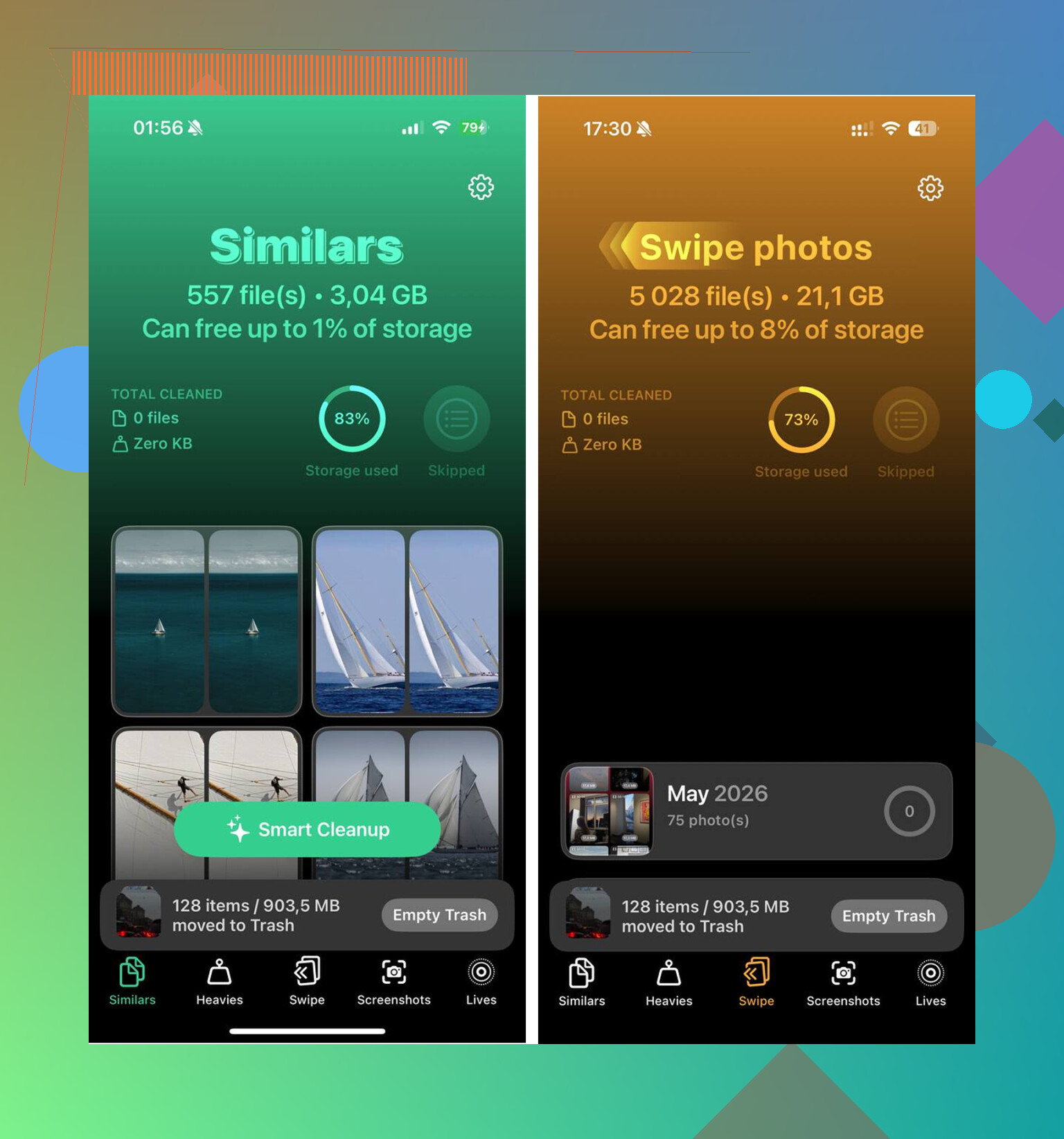
My library was the main problem. Trying to clean it by hand was awful. Too many near-duplicates, random screenshots, giant old videos I forgot were even there. I ended up using Clever Cleaner, mostly because I was tired of sorting thousands of files one by one. It is free, no ads, no paywall, which was rare enough for me to notice.
The parts I found useful:
- Similars grouped almost-identical shots together. Not strict duplicates, the usual burst of five photos where only one is worth keeping. It picked a best shot and I dumped the rest.
- Heavies listed the biggest files first with file sizes shown clearly. That made old 4K clips and screen recordings easy to spot.
- Screenshots laid out all the junk with sizes visible on each thumbnail. Mine had grown into a pile way bigger than I thought.
- It handled processing on the phone itself. I cared about that more than I expected once I started sorting personal photos.
I cleared about 15GB. After that, the phone felt normal again.
One thing people miss, empty Recently Deleted in Photos. Deleting stuff is only half the job. Those files sit there for 30 days and still count against storage until you clear them out yourself.
A few settings changes helped too
If storage is fine, or if you want to squeeze out a bit more speed, I would check these next.
Turn off Low Power Mode if you keep it on all day
It saves battery by cutting performance. Good for emergencies. Bad if your phone already feels slow.
Trim Background App Refresh
Go to Settings > General > Background App Refresh. I shut it off for apps I did not care about updating in the background. Fewer things running means less junk eating resources.
Enable Reduce Motion
Go to Settings > Accessibility > Motion and switch on Reduce Motion. This does not make the processor stronger, but it cuts transition effects which made the phone feel less choppy to me.
Update your apps
After an iOS update, some apps lag because they have not caught up yet. Open the App Store and update everything sitting there.
Battery health matters more than people think
Before you spend hours fiddling with settings, look at Settings > Battery > Battery Health.
If maximum capacity is under 80 percent, performance throttling often kicks in. Apple does this to prevent shutdowns on worn batteries. The end result feels like the phone aged five years overnight. At that point, no amount of cleanup is going to fully fix it.
I have seen battery replacement do more for speed than any software trick. It costs less than replacing the phone, and if the battery is shot, it is the cleaner fix.
Before a full wipe, try this one last step
If a week has passed, storage is under control, battery health is decent, and it still stutters, try Reset All Settings.
Path is Settings > General > Transfer or Reset iPhone > Reset > Reset All Settings.
This does not erase your apps or photos. It resets system settings, network stuff, display preferences, and other bits which sometimes get messed up after a major update. I have seen this fix lag when none of the smaller tweaks did.
I would save the factory reset for after all of this, not before.
4 Likes
I would skip the full wipe for now. @mikeappsreviewer covered storage, battery health, and Reset All Settings, so I’d look at a few other spots first.
-
Check Safari bloat.
Settings > Safari.
Clear History and Website Data.
If Safari feels sticky or your keyboard lags inside apps with web views, this helps more than people think. -
Remove bad widgets.
A broken widget chews memory all day.
Swipe to your widget screen, edit, remove the ones you do not need.
Same for Lock Screen widgets. -
Turn off Live Activities.
Settings > Face ID & Passcode > Live Activities, or per app.
Sports, delivery, ride apps, all keep poking the system. -
Mail fetch settings.
Settings > Mail > Accounts > Fetch New Data.
Set most accounts to Fetch, not Push.
Push keeps the phone busy. -
Check app size, not only photo size.
Settings > General > iPhone Storage.
If one app is huge, offload and reinstall that single app.
Social apps and messaging apps get clogged up. Reinstalling them often fixes freezing. Back up chats first if needed, dont skip tht. -
Keyboard lag fix.
Settings > General > Keyboard.
Turn off Predictive, Slide to Type, and Dictation for a day.
Third party keyboards are worse. Switch back to Apple keyboard and test. -
VPN and security apps.
These slow stuff down all the time.
Disable any always-on VPN, DNS filter, or antivirus app. iPhone does not need half that junk.
If your storage is packed with photos, Clever Cleaner is a decent way to clear duplicates and large videos fast. This review is a solid read if you want details before installing anything:
see this Clever Cleaner for iPhone review and storage cleanup guide
One thing I disagree with a bit, Reduce Motion makes the phone feel smoother to some people, but if you have real freezing, it hides the issue more than it fixes it.
If none of this changes anything, I’d test in this order. Delete one problem app. Reinstall it. Then Reset All Settings. Full erase is last resort, not step two.
I’d avoid the nuclear option for now. @mikeappsreviewer and @voyageurdubois already covered a lot of the usual fixes, so I’d check a couple things they did not really dig into.
First, look at overheating. If your iPhone feels warm a lot, performance drops hard. Cases can make it worse, esp thick ones. Try using it caseless for a bit while charging and see if the lag changes.
Second, check Accessibility stuff like Voice Control, Sound Recognition, or excessive notifications. Those can quietly hammer performance. Same with tons of Focus automations and Shortcuts running in the background. People forget those exist, then wonder why typing feels like it’s happening in molasses.
Also, open Settings > Privacy & Security > Analytics & Improvements > Analytics Data. If you keep seeing the same app name crashing over and over, that app may be dragging the whole phone down. Delete that one app before doing anything drastic.
One thing I sorta disagree on with others: app reinstalling is useful, but if the lag is system-wide, I’d look harder at corrupted iOS leftovers. In that case, try updating to the latest iOS point release if one is available, or even installing the same version via Finder/iTunes without erasing. That can refresh system files without wiping your data.
If storage is part of the mess, Clever Cleaner is still worth a look for clearing duplicate photos, big videos, and screenshot junk fast. I found this hands-on Clever Cleaner review for freeing up iPhone storage useful before trying it.
Full reset should be last last resort, not step two.