I accidentally formatted my USB flash drive before backing up important files, including photos and work documents. I’m looking for reliable data recovery software that can recover files from a formatted flash drive without making things worse. If anyone has recommendations or tips for the best USB data recovery tools, I’d really appreciate the help.
This happened to me once with a work USB, and the first thing I learned was simple. A format does not always mean your files are gone.
What matters most is the type of format.
If the drive got a Quick Format, your odds are often decent. That kind usually finishes fast, in a few seconds, and it mostly clears the file system records. Your files are often still sitting on the drive until new data lands on top of them.
A Full Format is a different story. That process writes over the storage, so normal recovery software usually won’t pull anything useful back.
One thing I had wrong for years, there is no real ‘unformat’ button for a USB drive. Once the format happened, it happened. Recovery tools are not reversing it. They scan the device, look for leftover file data, and try to rebuild what they find.
If you care about the files, stop using the USB right now.
Do not copy anything onto it.
Do not format it again.
Do not run CHKDSK.
Do not try random ‘repair’ tools.
Each write lowers your odds. I learned this the hard way on an old SanDisk stick. I kept poking at it, then half the photos were toast.
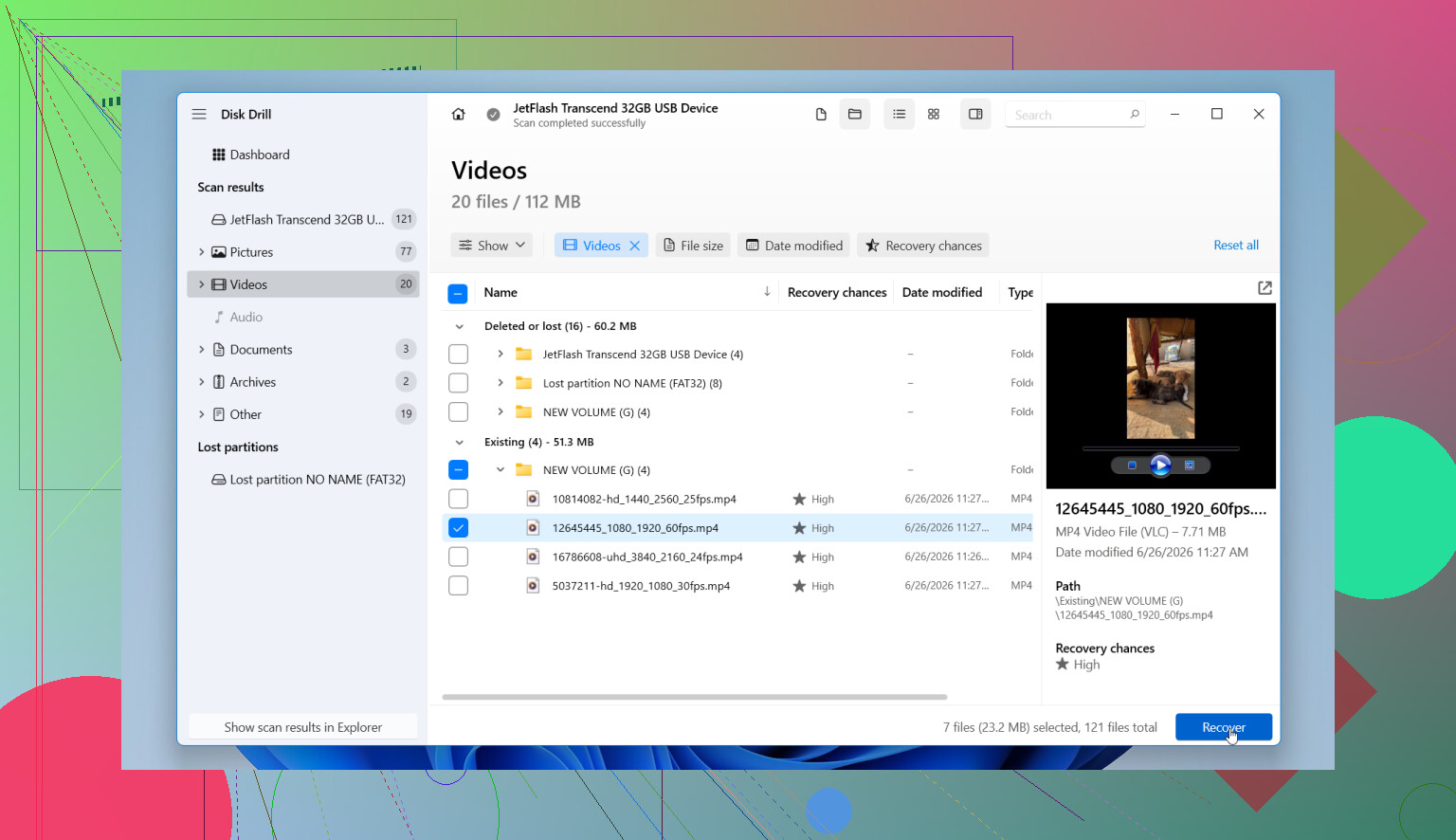
What I would do next is use a recovery app and keep the process clean. I’ve used Disk Drill before, mostly because the layout is easy to follow and it did not fight me.
Steps I’d take:
- Install Disk Drill on your computer’s internal drive. Do not install it on the USB you want to recover.
- Plug in the formatted flash drive.
- Open Disk Drill and pick the USB from the device list.
- Hit Search for Lost Data, then choose Universal Scan when it asks.
- Let the scan run all the way. You can peek early, but I’d wait. I got better results doing tht.
- Preview what shows up. If a photo or document opens fine in preview, your recovery odds for that file are usually better.
- Recover the files to another drive, not back to the same USB.
One part people skip, and I would not skip it if the drive looks flaky, is the disk image option. Disk Drill lets you make a byte-for-byte image of the USB. If the stick keeps disconnecting, throws read errors, or acts weird, image it first and scan the image instead. I did this once with a dying flash drive and it saved me from a second pass on failing hardware.
Also, do not freak out if recovered files come back with ugly names or missing folders. After formatting, that happens a lot. The main thing to check is whether the file itself still opens and the contents are intact.
So yeah, recovery from a formatted flash drive is often possible, mostly after a quick format. Time matters. Leave the drive alone, scan it soon, and save recovered files somewhere else.
17 Likes
I’d look at it from the file type angle, not only the format angle.
For photos and work docs, PhotoRec is still one of the best free picks. It ignores the broken file system and carves files by signature. It pulls JPG, PNG, PDF, DOCX, XLSX, ZIP, a lot of stuff. Downside, filenames and folders are often gone. Messy, but useful.
Recuva is worth a shot too if the format was light and the USB is still healthy. It’s weaker on badly damaged file systems, but it’s fast and easy.
I partly disagree with @mikeappsreviewer on one thing. Full format is bad news, yes. But on newer Windows versions, results vary by device and format path, so I would still scan before writing it off. I’ve seen weird edge cases.
If you want the easiest all around option, Disk Drill is a solid choice for formatted USB recovery. It tends to do better than Recuva on mixed file types from flash media, in my experiance.
Best data recovery software for a formatted USB flash drive
Also, if you want a quick visual on recovery stuff, this is decent:
watch this USB data recovery clip
My order would be:
- PhotoRec, free, ugly, strong.
- Disk Drill, easiest interface, good scan results.
- Recuva, fast first pass.
Recover to your computer, not the USB. If the files matter a lot, stop tesitng too many tools after the first deep scan and clone the drive first.
I’d be a little more cautious than @mikeappsreviewer and @reveurdenuit about hopping between multiple apps right away. Every scan is read-only in theory, sure, but cheap flash drives can get sketchy fast when they’re already failing.
My pick for formatted flash drive data recovery is still Disk Drill, mostly because it handles USB sticks well, lets you preview recoverable files, and is less of a pain than a lot of older tools. For photos + office docs, that matters. If your format was quick, it has a real shot. If it was full, chances drop hard, but I still wouldn’t call it impossible untill you scan.
What I’d do differently:
- check the USB’s reported size first
- if it suddenly shows wrong capacity, stop and suspect hardware/controller issues
- if the files are super important, make an image first
- recover only the highest-value files first, not everything
Also, don’t judge success by folder structure. After a format, filenames can come back mangled and folders may be gone, but the actual files can still be fine.
If you want more reading on recovering files from a formatted USB flash drive, this is actually pretty relevant:
how to recover files from a formatted USB flash drive
Short version:
- Best easy option: Disk Drill
- Best free brute-force option: PhotoRec
- Fast old-school option: Recuva
If the drive keeps disconnecting or makes Windows freeze, skip software experiments and deal with it like a failing device, not just a deleted-files problem. That part gets overlooked a lot tbh.